
Book Nook vs Hardcover
Updated
Book Nook is the Hardcover alternative to pick: of the nine apps we compared, it is the only one that shows your books on a bookshelf and the only one with both a reading timer and book clubs. Both run on iPhone, Android and the web, and have friends, goals, statistics and Goodreads and StoryGraph import. Book Nook adds themed shelves with 65 decorations, a Lock Screen reading timer, monthly and yearly Reading Wrapped, spoiler-safe book clubs, reading challenges and widgets. Every feature is free. Hardcover charges $4.99 a month or $49.99 a year for its Supporter plan, which adds stats for any date range.
Book Nook and Hardcover are both independent reading trackers on iPhone, Android and the web. Of the nine apps in our comparison of bookshelf apps, Book Nook is the only one with all 16 features in the table, and no other app has more than 12.
Book Nook and Hardcover side by side
| Feature | Book Nook | Hardcover |
|---|---|---|
| Price | Free, no paid tier | Free; Supporter $4.99 a month or $49.99 a year |
| Platforms | iPhone, Android, web | iPhone, Android, web |
| Books shown on a bookshelf | Yes, covers or spines on wooden shelves, arranged by dragging | Lists and grids of covers |
| Shelf themes and decorations | 5 themes, a custom theme, decorations | No |
| Barcode scanning | Yes | Yes |
| Reading timer | Yes, sessions with pages read | No |
| Timer on the Lock Screen | Yes, Live Activity on iPhone, notification on Android | No |
| Reading statistics | Minutes, pages, calendar, streaks, genres, ratings | Yes; any date range in Supporter |
| Year in review | Reading Wrapped | Yearly recap |
| Reading goals | Yearly books, daily minutes | Books or pages, for any dates |
| Reading challenges | Yearly challenge, and challenges anyone can create | No |
| Book clubs | Yes, spoiler-safe by page | No |
| Follow friends and a feed | Yes | Yes |
| Ratings | Quarter stars, reviews | Half stars, reviews |
| Home screen widgets | iPhone and Android, including your bookshelf | No |
| Import | Goodreads, StoryGraph, Fable | Goodreads, StoryGraph, CSV |
Hardcover checked on 3 November 2026: App Store listing, hardcover.app/supporter, roadmap.hardcover.app, docs.hardcover.app/api/graphql/schemas/readingjournals.
What Hardcover offers
Hardcover is an independent book tracker on iPhone, Android and the web, with reading statuses, lists, ratings, a barcode scanner, friends and a yearly recap. As of November 2026 it has no bookshelf view, reading timer, book clubs, reading challenges or home screen widgets.
Your books on a bookshelf
In Book Nook each book stands on a wooden shelf as its cover or its spine, and you arrange the shelf yourself. Hardcover shows lists and grids of covers.
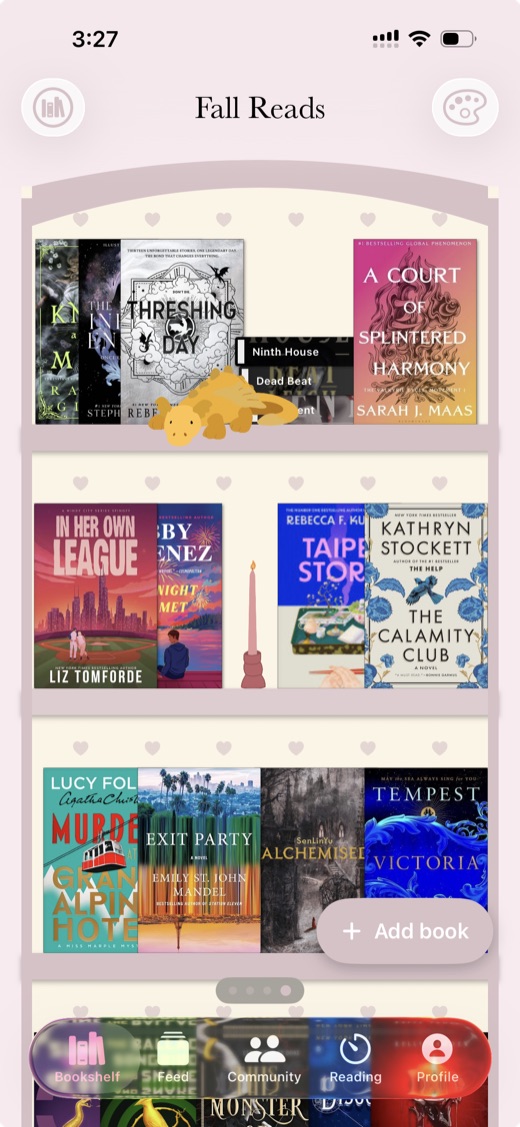
- Five themes (Simple, Dark Academia, Cottagecore, Coquette and Matcha Cafe), or your own theme with your choice of wall, board and frame colours, frame style, back pattern, ornament and title font.
- 65 decorations, such as plants, candles, lamps and dragons, between the books.
- Drag books to arrange them, stand each one cover-out or spine-out, tilt a book or lay it flat. In the phone apps a two-finger twist tilts a book.
- Real book sizes draws each book at its edition's height: mass market, paperback, large or oversize.
- Shelf lights under the boards, and as many bookshelves as you like.
- List and Mosaic views of the same books, with search and sort. Switching moves nothing on the bookcase.
The Bookshelf widget puts the bookcase on your home screen. On iPhone it comes in medium and large, plus extra large portrait on iOS 27. On Android it resizes from 4 by 2 cells up to the whole home screen. See the bookshelf widget and aesthetic bookshelf ideas.
Adding books by search, barcode or by hand
Search shows matches from Book Nook's own catalogue at once, adds Open Library's results, then fills in author, cover, page count and description from the catalogue, ISBNdb and Google Books. The barcode scanner works in both phone apps and in the web app, so you can add a whole bookcase one scan at a time. A book no source has can be added by hand with your own photo as the cover.
Each book has a status (to be read, reading, finished or did not finish), page progress and a rating in quarter stars. Book Nook also keeps a list of new releases, out this week and coming soon, and a page for every author and series. Cataloguing a home library by barcode has the steps.
Reading timer on the Lock Screen
Book Nook's reading timer records each session with minutes and pages read, and each book page lists its sessions.
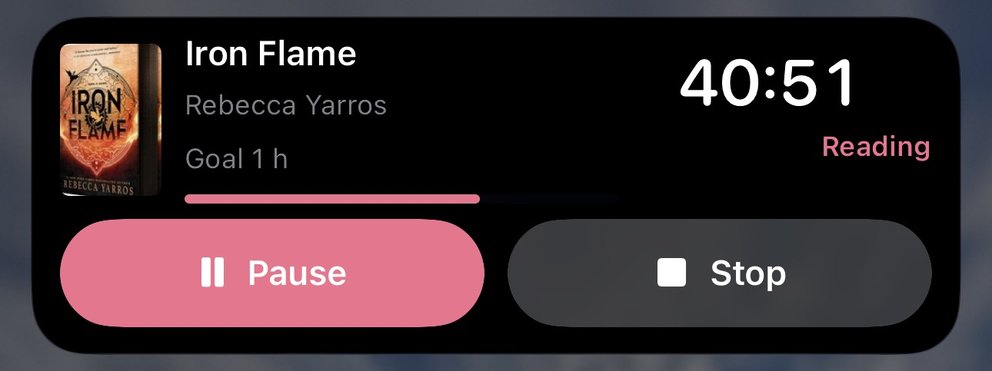
- On iPhone the running timer shows on the Lock Screen and in the Dynamic Island as a Live Activity.
- On Android it is a notification with Pause and Stop; on Android 16 and later, a Live Update with the clock in the status bar.
- Start reading without opening the app from Control Center, the Lock Screen or the Action button on iPhone (iOS 18 or later), and from Quick Settings, a widget or a launcher shortcut on Android.
- A daily reminder on iPhone and Android names the book you are reading. It is on at 6:00 PM by default, skips days you have already read, and you can change the time or turn it off.
Reading statistics and goals
Every Book Nook statistic is free, for the last 7 days, the month or the year: minutes and pages over time, a reading calendar, streaks, books finished, pace toward your yearly goal, your fastest read in pages a day, a ratings chart, and top authors and genres. The timer feeds them with the minutes and pages of each session.
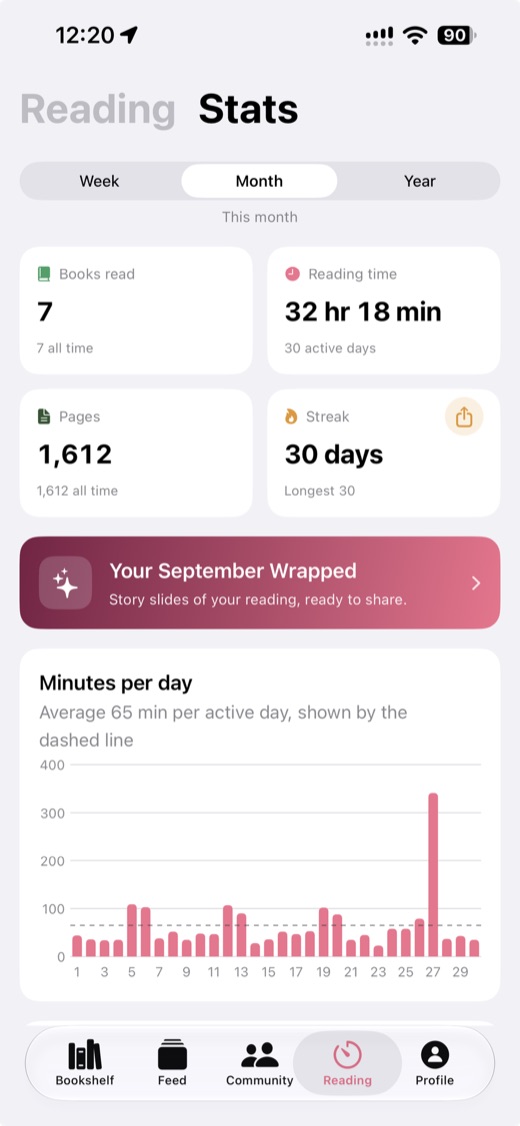
Goals are daily minutes, 30 to start, and a yearly book count. Widgets on iPhone and Android show today's minutes, the streak and the yearly goal, and iPhone adds Lock Screen widgets. See choosing a reading tracker app.
Reading Wrapped every month and year
Book Nook makes a Reading Wrapped for last month, the month so far, and the year from 1 December. Its pages show up to 12 books you finished, your time with books, your favourites with top authors and genres, and a summary. Each is a 9:16 image with real covers, shared to Instagram Stories and TikTok from the phone apps and shared or saved on the web. Hardcover has a yearly recap. How Reading Wrapped works.
Friends, book clubs and reading challenges
Hardcover has friends and a feed. Book Nook has a feed with likes and comments on all three platforms, showing what the readers you follow are reading, finishing and reviewing, plus these community features:
- Reviews and threads on every book page, with inline spoiler tags readers tap to show.
- Book clubs that read one book at a time. Each comment records its writer's page, and a comment from a member further ahead stays folded until you reach that page.
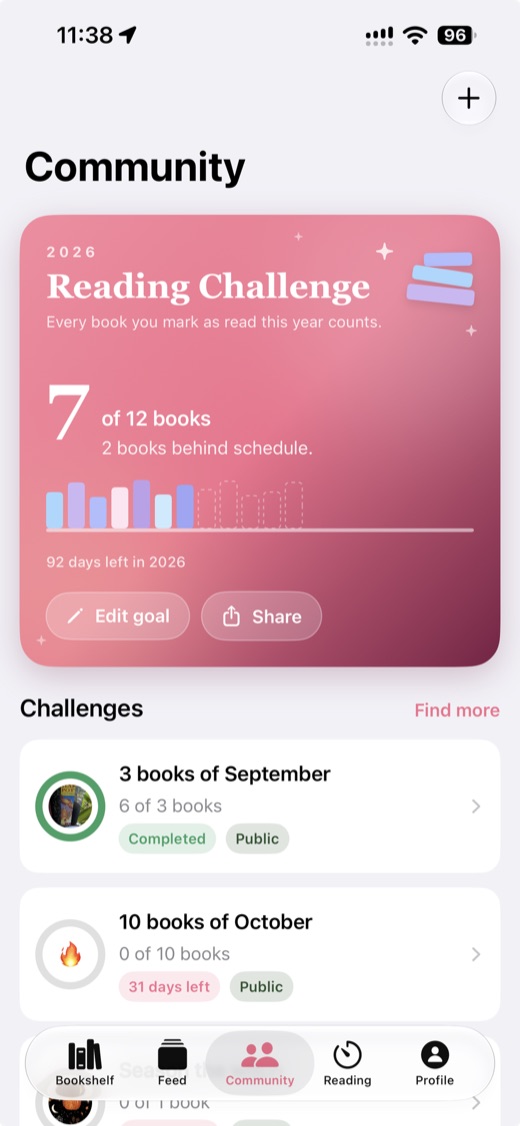
- Reading challenges with a goal and a deadline that any reader can create, plus the yearly challenge.
- Nooks: groups with a thread of posts, including official ones by genre and a New releases nook.
- Points for reviews, posts and finished books, and stamps on your public profile. Readers who join before 1 January 2027 get a founding member stamp with their reader number.
See the book club app guide and reading challenge ideas for 2027.
Platforms, sync and price
Book Nook runs on iPhone and iPad (iOS 17 or later), Android 8.0 or later, and the web at trybooknook.com. Books, bookshelves and sessions sync through your account, so a book scanned on the phone is on the web shelf too, and you can export everything as a JSON file at any time. It is free with no subscription, no paid tier and no ads; every theme and widget is included. Hardcover's Supporter plan costs $4.99 a month or $49.99 a year.
Which readers Book Nook suits
Readers with a physical bookshelf
Scan each barcode and the book goes on a shelf with its cover. With Real book sizes on, mass market and oversize editions stand at their own heights, and you can make one bookshelf for each bookcase at home, so the digital shelf can match the real one. Book Nook vs Libib and Book Nook vs LibraryThing compare it with two home-library cataloguers.
Readers who want an aesthetic digital shelf
Choose which bookshelves other readers see on your public profile, each in its own theme with the books where you placed them and your decorations. In the iPhone and Android apps you can share a shelf as an image, to an Instagram story, or to the feed as a post with a picture of the shelf. See the virtual bookshelf app guide.
Readers who track with statistics
The timer logs minutes and pages per session, and the statistics, streaks, goals, widgets and monthly Wrapped build on them, all free. Goodreads vs StoryGraph sets Book Nook's statistics against both, and Book Nook vs StoryGraph covers the stats-focused tracker.
How to switch from Hardcover to Book Nook
Book Nook imports Goodreads, StoryGraph and Fable files. It has no Hardcover importer, so a library that started on Goodreads or StoryGraph moves across from that app's export.
- If your Hardcover library came from Goodreads or StoryGraph, export it again from there. On Goodreads: My Books, Import and export, Export Library. On StoryGraph: Manage account, Manage your data, Export StoryGraph library.
- Create a free account in the iPhone or Android app or at trybooknook.com/signup.
- Open Import books (in the phone apps: the Profile tab, the settings icon at the top right, then Import books; on the web: Settings, then Import books under Library), choose the app and pick the file.
- Review every book and choose where it goes: bookshelves by status, by your own shelves, or one bookshelf. Statuses, ratings, dates and reviews come across, and you can undo the import for 7 days.
- Add books you logged only on Hardcover by search or barcode.
- Pick a theme, arrange your shelf and add the Bookshelf widget.
Moving from Goodreads has the full steps, and Goodreads alternatives and StoryGraph alternatives compare the other apps. See also Book Nook vs Goodreads and Book Nook vs StoryGraph.
Questions
Is Book Nook better than Hardcover?
Yes. Of the nine apps we compared, Book Nook is the only one with all 16 features in our comparison table, and no other app has more than 12. It has a bookshelf you can see, a reading timer, book clubs and reading challenges; Hardcover has none of these as of November 2026.
Book Nook also makes a Reading Wrapped every month, has home screen widgets, and includes every statistic free.
Is Hardcover free?
Hardcover is free to use, with a Supporter plan at $4.99 a month or $49.99 a year that adds stats for any date range. Book Nook is free with no paid tier and no ads.
Does Hardcover have a reading timer?
No, as of November 2026. Book Nook has one that logs minutes and pages per session, shows on the iPhone Lock Screen and Dynamic Island as a Live Activity, and runs as a notification with Pause and Stop on Android.
Can I import my Hardcover library into Book Nook?
Book Nook has no Hardcover importer. It imports Goodreads, StoryGraph and Fable files, so if your Hardcover library started on Goodreads or StoryGraph, export it from there and choose that app under Import books. Add later books by search or barcode.
Does Hardcover have book clubs?
No, as of November 2026. Book Nook has book clubs that read one book at a time and fold each comment until you reach the page it was written at, plus reading challenges and nooks.
Does Hardcover show your books on a bookshelf?
No. Hardcover shows lists and grids of covers. Of the nine apps we compared, Book Nook is the only one that shows your books on a bookshelf: themed shelves with 65 decorations, books cover-out or spine-out, plus List and Mosaic views.
Does Book Nook track series and half-star ratings?
Yes. Book Nook has a page for every series and every author, and rates books in quarter stars, so 3.75 is a rating you can give.
Does Book Nook work like a reading journal?
Each book in Book Nook keeps its start and finish dates, every reading session with pages read, a rating in quarter stars and your review with spoiler tags. The reading calendar and monthly Wrapped show your reading over time.
Does Book Nook have widgets?
Yes. iPhone and Android have Bookshelf, Currently reading, Today's reading, Yearly goal and Reading timer widgets, and iPhone has Lock Screen widgets for the goal, the streak and the current book.
Is Book Nook on Android and the web?
Yes. Book Nook runs on iPhone and iPad (iOS 17 or later), Android 8.0 or later and the web, synced through one account.