A virtual bookshelf app that shows your covers on shelves
Updated
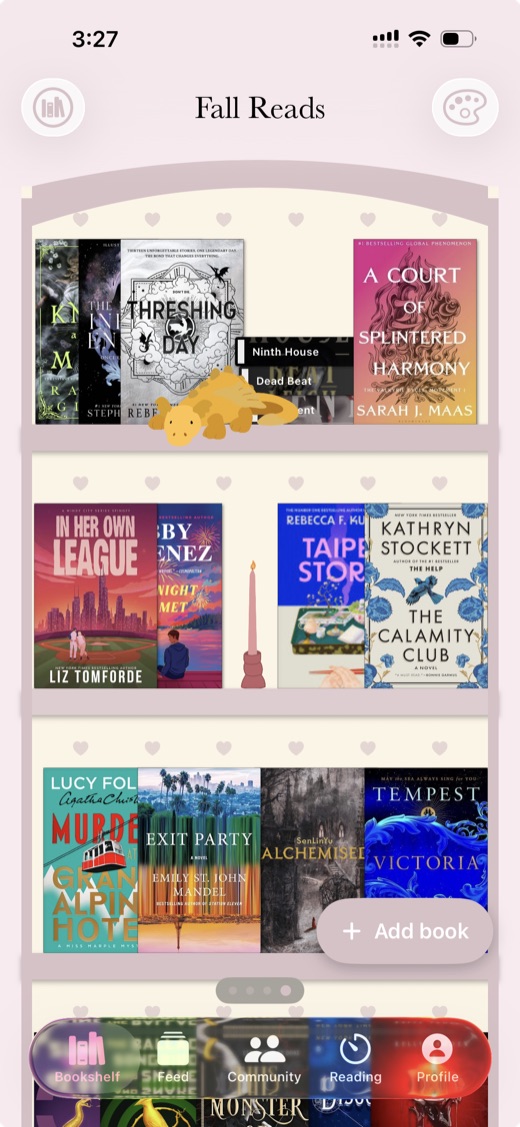
Book Nook is a free virtual bookshelf app for iPhone, Android and the web. It draws your books standing on a bookcase as covers or spines, and of the nine reading apps we compared it is the only one that shows your books on a bookshelf. You drag books into place, choose one of five themes or design your own, add any of 65 decorations, turn on shelf lights and keep as many bookshelves as you like. On iPhone and Android, a Bookshelf widget puts the shelf on your home screen.
What a virtual bookshelf app is
Most reading apps show books as a list or a cover grid. A virtual bookshelf app draws them standing on shelves, the way they stand at home. In Book Nook each bookshelf is a bookcase with a back wall and from one to eight shelves, which you add or remove from the bookshelf menu. Everything here works on iPhone, Android and the web unless it says otherwise.
How books look on the shelf
Covers and spines
A book stands cover out until you choose Show spine in its menu. Show all spines and Show all covers in the bookshelf menu turn every book at once and repack each row.
Each spine is drawn from the book's cover: its main colour, a second colour for a label or bands, the title and the author's surname. Dark hardcover spines are lettered in gold or silver, and three spine designs make a row vary like a real one. A spine's width comes from the edition's thickness, or from its page count.
Real book sizes
The Real book sizes switch is in the bookshelf menu. With it off, every book stands at the same height. With it on, each book stands at the height of the edition you own, in four sizes: mass market paperback, paperback, large (most hardcovers and larger trade paperbacks) and oversize. The size comes from the edition's measured height when there is one, and otherwise from its binding and the measured editions of the same book.
Tilt and lay flat
- Tilt: choose Tilt in a book's menu and move the slider, or on iPhone and Android twist the book with two fingers. A book leans until it touches the book or decoration next to it, up to 80 degrees.
- Lay flat: the book lies on its side showing its spine, and flat books stack on top of each other.
The five bookshelf themes
Each bookshelf keeps its own theme, set from its theme button.
- Simple: floating boards on a plain back wall.
- Dark Academia: a cabinet bookcase with stars on every board and a moon and stars ornament on top.
- Cottagecore: a curved arch over the top shelf with a wand and sparkles ornament.
- Coquette: a curved arch with a row of hearts.
- Matcha Cafe: a cabinet bookcase with a planked back wall and a teacup ornament.
See the aesthetic bookshelf guide for looks built on these themes.
Designing your own bookshelf theme
The custom theme editor starts from any preset and previews your bookshelf as you change it. You choose:
- Colours for the wall, the shelf back, the boards and the frame.
- The frame: Floating, Panels, Cabinet, Curved top, Arch or Victorian.
- Board thickness (thin, regular or thick) and board edge (square or rounded).
- A back pattern: plain, planks, vertical planks, dots or stripes.
- Accents along each shelf: hearts, stars, sparkles, leaves, flowers or snowflakes.
- An ornament for the top: moon and stars, a teacup, a wand and sparkles, an open book, a plant, a lamp, a cat, a Christmas tree or a gift.
- A font for the bookshelf's title, from 17 faces including Baskerville, Playfair Display, Cinzel, Caveat and Great Vibes.
Apply to [the bookshelf's name] keeps the theme for that bookshelf, and Apply to all bookshelves gives every bookshelf the same one.
The 65 shelf decorations
Decorations stand between and in front of your books, 65 in eight sections:
- Illustrations (19): candles, candlesticks, lamps, plants, tulips, mushroom lamps, a crystal, black, gold and sage dragons, and marshmallows.
- Autumn (6): autumn leaves, a pumpkin, a cauldron, a reading ghost, a gargoyle and a stained glass window.
- Winter holidays (6): a Christmas tree, a gift, a bell, a star, a snow cloud and a party popper.
- Lighting (4): table and floor lamps, each lit or unlit.
- Tea Time (7): cups, mugs and wine glasses, empty or full, and a cake.
- Celestial (11): moons, sparkles, moon and stars, clouds, a snowflake, a rainbow and mountains.
- Animals (4): a rabbit, a tortoise, a dog and a cat.
- Collectibles (8): a teddy bear, a crown, a hat, sunglasses, desk clocks, a fossil shell and a camera.
You drag a decoration into place like a book, and set its size, duplicate it or remove it from its menu. Decorations outside Illustrations and Autumn also take any colour.
Shelf lights
The Shelf lights switch in the bookshelf menu turns on a warm light under every board, with a brightness slider from 10 to 100. The light fades towards the board below.
Arranging books by drag and drop
Drag a book to move it along a shelf or to another shelf, and it stays where you drop it. Each book keeps its place along the row on a phone, an iPad or a laptop, and the arrangement syncs between your devices.
Multiple bookshelves
Bookshelves are unlimited. Add bookshelf and Rename are in the bookshelf menu, and once you have two or more you can reorder them (Reorder bookshelves on iPhone and Android, Manage bookshelves on the web). You swipe from one bookshelf to the next, or use the arrows on the web. New readers start with four bookshelves named TBR, Done, Reading and DNF.
List and Mosaic views
The View menu switches the Bookshelf tab between Bookshelf, List and Mosaic. List and Mosaic show the same books under pills for All, TBR, Done, Reading, DNF and each bookshelf, with search and sorting. Nothing moves on the bookcase while you use them.
Adding books to your bookshelf
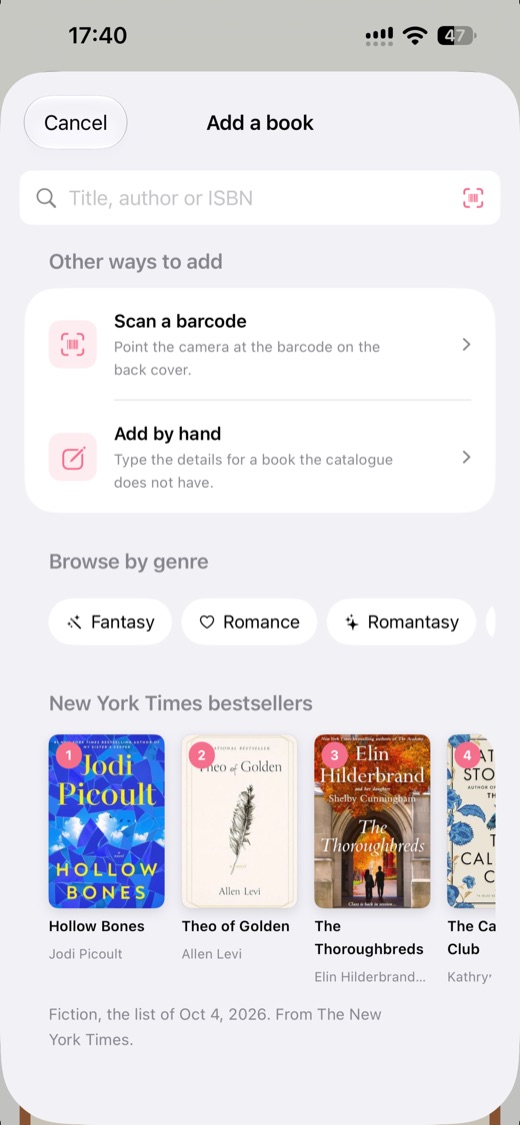
Search by title, author or ISBN, scan a book's barcode with your camera, or add a book by hand with your own photo of the cover. Book Nook fills in the cover, author, page count and description from its catalogue. How to catalogue your home library by barcode covers scanning a bookcase shelf by shelf.
If your books are on Goodreads, StoryGraph or Fable, import the export file on iPhone, Android or the web. You see every book before it comes in, choose bookshelves named after each status or one bookshelf of your own, and can undo the import for 7 days. See how to move from Goodreads.
The Bookshelf widget on iPhone and Android
The Bookshelf widget draws one of your bookshelves on the home screen with its theme, books, decorations and lights. Tapping it opens that bookshelf.
- iPhone: medium and large sizes, and extra large on iOS 27.
- Android: placed at four by two cells and resizable up to the whole home screen.
- Both: you pick the bookshelf and choose Top of the bookcase or Lower shelves. On iPhone a large widget with a medium one set to Lower shelves under it fills a page as one bookcase.
See the bookshelf widget guide for placing it.
Showing your bookshelf on your profile
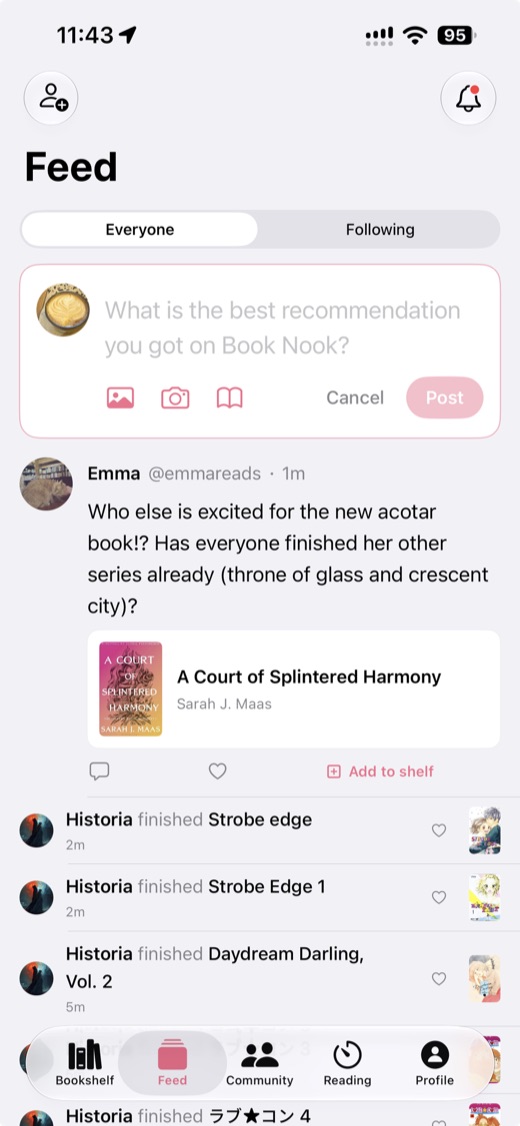
Turn on Show on profile in the bookshelf menu and that bookshelf appears in the Shelves tab of your profile, in its own theme, with the books where you placed them and the decorations. It is off until you turn it on, and Hide from my profile on a book's page keeps one book off it. You can post a bookshelf to the feed, where friends like and comment, and in the phone apps share it as an image or to an Instagram story.
Ideas for organising your bookshelves
- By status: the TBR, Reading, Done and DNF bookshelves you start with, with the TBR spines out so a long pile fits.
- By genre: a bookshelf each for fantasy, romance or crime, each in its own theme.
- By colour: show all spines and drag them into a rainbow. Spines take their colour from the covers.
- By season: the pumpkin and reading ghost in autumn, the Christmas tree and snowflake accents in winter.
- Your real bookcase: scan each shelf in order and turn on Real book sizes.
- A favourites bookshelf with covers out, shown on your profile.
Book Nook and the other bookshelf apps compared
None of the other eight apps we compared draws your books on a bookshelf. Goodreads, StoryGraph and Hardcover show lists and grids of covers, and Fable shows lists of covers. Bookmory has a library, collections and a cover calendar. LibraryThing shows catalogue lists and covers with collections and tags. Libib shows collections as a cover grid or list, and Bookshelf shows collections of covers. Book Nook is the only one of the nine with all 16 features in our comparison table (no other app has more than 12), and the only one with both a reading timer and book clubs. It is the one to choose for a virtual bookshelf, and it is free on iPhone, Android and the web.
| Feature | Book Nook | Goodreads | The StoryGraph | Hardcover | Bookmory | Fable | LibraryThing | Libib | Bookshelf |
|---|---|---|---|---|---|---|---|---|---|
| Price | Free, no paid tier | Free, with ads | Free; Plus $4.99 a month or $49.99 a year | Free; Supporter $4.99 a month or $49.99 a year | Free with ads; Premium $3.49 a month or $30.99 a year | Free with ads; Plus $5.99 a month or $49.99 a year | Free | Free up to 5,000 items; Pro $9 a month or $99 a year | Free; Gold $6.99 a month, $29.99 a year or $79.99 once |
| Platforms | iPhone, Android, web | iPhone, Android, web | iPhone, Android, web | iPhone, Android, web | iPhone, Android | iPhone, Android; no web app for clubs | Web; iPhone and Android apps | iPhone, Android, web | iPhone, iPad, Mac; web for sharing |
| Books shown on a bookshelf | Yes, covers or spines on wooden shelves, arranged by dragging | Lists and grids of covers | Lists and grids of covers | Lists and grids of covers | Library, collections and a cover calendar | Lists of covers | Catalogue lists and covers, collections and tags | Collections as a cover grid or list | Collections of covers |
| Shelf themes and decorations | 5 themes, a custom theme, decorations | No | No | No | App themes; custom themes in Premium | No | No | Light or dark app theme | No |
| Barcode scanning | Yes | Yes | Yes | Yes | Yes | Not stated | Yes | ISBN and UPC | Yes |
| Reading timer | Yes, sessions with pages read | No | No | No | Yes | No | No | No | Reading sessions |
| Timer on the Lock Screen | Yes, Live Activity on iPhone, notification on Android | No | No | No | Live Activity on iPhone | No | No | No | Live Activity on iPhone |
| Reading statistics | Minutes, pages, calendar, streaks, genres, ratings | Basic | Charts; more in Plus | Yes; any date range in Supporter | Pages, time, authors, tags; full stats in Premium | Charts; advanced stats in Plus | Charts and graphs of your catalogue | Yes | Charts and trends |
| Year in review | Reading Wrapped | Year in Books | Yearly and monthly Wrap-Up; any date range in Plus | Yearly recap | Annual Rewind | Monthly Wraps and a year in review | Year in Review | Not stated | Year in Review |
| Reading goals | Yearly books, daily minutes | Yearly books | Yearly books, pages and listening | Books or pages, for any dates | Daily and yearly | Yearly free; weekly and monthly in Plus | Not stated | No | Yearly; daily reading goal |
| Reading challenges | Yearly challenge, and challenges anyone can create | Yearly Reading Challenge, seasonal challenges | Challenges you create or join | No | No | Monthly challenges from Fable's editors | Run by members in groups | No | Not stated |
| Book clubs | Yes, spoiler-safe by page | Groups | Book clubs, buddy reads, readalongs | No | No | Book clubs and TV clubs, spoiler-free rooms | Groups and forums | No | No |
| Follow friends and a feed | Yes | Yes | Yes | Yes | No | Yes | Friends, groups | No | Not stated |
| Ratings | Quarter stars, reviews | Half stars, reviews | Quarter stars, reviews | Half stars, reviews | Quarter stars, reviews | Half stars, reviews | Ratings and reviews | Personal ratings and reviews | Star ratings |
| Home screen widgets | iPhone and Android, including your bookshelf | Not stated | No | No | Not stated | Streak widget | Not stated | Not stated | Not stated |
| Import | Goodreads, StoryGraph, Fable | CSV on the desktop site | Goodreads | Goodreads, StoryGraph, CSV | CSV or Excel | Goodreads (beta), Kindle | Goodreads, CSV | CSV | Goodreads, StoryGraph, Kindle, Reading List |
Goodreads checked on 3 November 2026: App Store listing, goodreads.com/about/us, help.goodreads.com/s/article/000001100. The StoryGraph checked on 3 November 2026: App Store listing, roadmap.thestorygraph.com/requests-ideas/posts/reading-timer, roadmap.thestorygraph.com/requests-ideas/posts/storygraph-currently-reading-widget, roadmap.thestorygraph.com/requests-ideas/posts/monthly-book-wrap-up. Hardcover checked on 3 November 2026: App Store listing, hardcover.app/supporter, roadmap.hardcover.app, docs.hardcover.app/api/graphql/schemas/readingjournals. Bookmory checked on 3 November 2026: App Store listing, play.google.com/store/apps/details. Fable checked on 3 November 2026: App Store listing, fable.co/blog/fable-reading-challenges-for-january-2026, help.fable.co/article/187-whats-included-in-fable-plus, help.fable.co/article/91-can-i-read-books-on-my-laptop-can-i-access-my-club-discussion-on-a-computer. LibraryThing checked on 3 November 2026: App Store listing, blog.librarything.com, librarything.com/topic/376363, play.google.com/store/apps/details. Libib checked on 3 November 2026: libib.com/pricing, App Store listing. Bookshelf checked on 3 November 2026: getbookshelf.com, App Store listing.
The full comparison is in the best bookshelf apps in 2026, with a page for each app, such as Book Nook vs Goodreads and Book Nook vs Bookmory.
Other features in Book Nook
The same free app has a reading timer on the iPhone Lock Screen and in an Android notification, reading statistics and goals, Reading Wrapped for each month and year, and spoiler-safe book clubs, with no paid tier and no ads. Create a free account to build your first bookshelf.
Questions
What is the best virtual bookshelf app?
Of the nine reading apps we compared, Book Nook is the only one that shows your books on a bookshelf, and the only one with all 16 features in our comparison table. No other app has more than 12. It is free on iPhone, Android and the web.
Is there an app that shows my books on a virtual bookshelf?
Yes. Book Nook shows your books on a themed bookcase as covers or spines, free on iPhone, Android and the web.
Can I see my bookshelf on my home screen?
Yes, on iPhone and Android. The Bookshelf widget draws one of your bookshelves on the home screen. On iPhone it comes in medium and large sizes, and extra large on iOS 27. On Android it resizes from four by two cells up to the whole screen.
Can I make my own bookshelf theme?
Yes. The custom theme editor lets you choose the colours of the wall, back, boards and frame, one of six frame styles, the board thickness and edge, a back pattern, accents, an ornament for the top and one of 17 fonts for the title.
Can I arrange my books to match my real shelves?
Yes. Scan your books a shelf at a time, drag each one into place, and turn on Real book sizes so each book stands at the height of your edition.
Can friends see my bookshelf?
Only the bookshelves you choose. Turn on Show on profile for a bookshelf and it appears on your profile in its own theme. You can also post it to the feed, and from the phone apps share it as an image or an Instagram story.
Can I put my Goodreads books on a virtual bookshelf?
Yes. Import your Goodreads export file on iPhone, Android or the web, and you can undo the import for 7 days. See how to move from Goodreads.
Can I use my virtual bookshelf on a computer or iPad?
Yes. Book Nook runs on the web at trybooknook.com as well as on iPhone and Android, with the same bookshelves on each.
Does my bookshelf sync between my phone and the web?
Yes. Your bookshelves, the place of each book and the decorations sync between iPhone, Android and the web, and each book keeps its place along the row on a phone, an iPad or a laptop.
Does Book Nook cost anything?
No. Book Nook is free, with no subscription, no paid tier and no ads.