
The best reading tracker app with statistics
Updated
Book Nook is the reading tracker app we recommend for statistics. It is free on iPhone, Android and the web with no paid tier and no ads. It times your reading and shows minutes, pages, streaks, a reading calendar, top authors and genres and a ratings chart, with a daily minutes goal, a yearly books goal and a Reading Wrapped for every month and year. Of the nine apps we compared, it is the only one with all 16 features in our comparison table, and no other app has more than 12.
What a reading tracker should record
Statistics come from what the app records. A useful reading tracker records five things:
- Every book and its status, with the dates you started and finished it.
- Where you are in the book, by page, or by percent for e-readers.
- How long you read, session by session. A count of finished books says little about a month spent on one long novel.
- A rating and, if you like, a review.
- A goal for the day and one for the year.
Book Nook records all five. Your books and sessions sync between iPhone, Android and the web, and each shows the same statistics.
Reading statistics in Book Nook
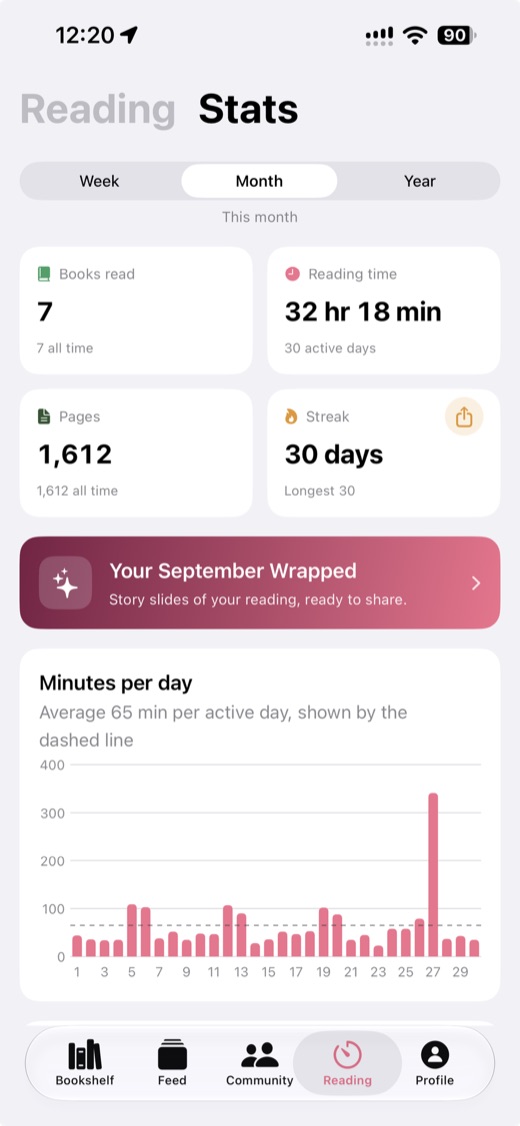
In the apps, statistics sit on the Reading tab next to the timer. Week, Month and Year chips change the range of every card: the last 7 days, the current month or the current year.
Reading time, pages and streak
The first card shows reading time for a week or month, and books read for the year, with tiles for pages and your current streak of days in a row with reading. Tap Books read to list the books you finished in the range. A share button makes a card with your current and longest streak. A bar chart shows minutes for each day, or for each month on the Year range, with a dashed line for your average per active day or per active month.
Reading calendar
The calendar shows the range as days: one row of the last seven days on the Week range, and a grid of the month on the Month and Year ranges. Each day shows the cover of the book you finished that day, or else the book you read longest in a timer session that day. Tap a cover to open the book. On the Year range you can page through the months.
Library, pace and ratings
- Library: how many books are to be read, reading, finished and did not finish, with the newest covers in each.
- Pages a day, from finished books with a start and finish date, and your fastest finish.
- Pages an hour, from timed sessions where you entered the page you reached.
- A ratings chart with one bar for each quarter star from 0.25 to 5 and one for unrated finished books. Tap a bar to list its books.
- Top authors and top genres among the books you finished. A book that is both fantasy and romance counts as romantasy, and a specific genre replaces the broad one it belongs to, so a book never counts twice under the same genre.
Averages, longest session and best weekday
Six more numbers for the range: average minutes per active day, your longest session and its book, your best weekday by minutes, your average rating, the number of timer sessions, and active days out of the days so far.
Reading goals in Book Nook
- A daily minutes goal of 15, 30, 45, 60 or 90 minutes, picked on the Reading tab. A ring shows today's minutes against it, including a session still running, with a line such as "Met on 4 of the last 7 days". On iPhone and Android you get a notification when you reach it, even with the app in the background.
- A yearly books goal, set when you join the yearly reading challenge on the Community tab. A ring shows the books finished this year and how many are left.
The Community tab also has challenges any reader can create with a goal and a deadline. There are ideas for one in 2027 reading challenge ideas.
The reading timer
Minutes, pages an hour, streaks and active days come from the timer. Pick the book, tap Start, pause when you are interrupted and stop when you are done. Enter the page or percent you reached, and Book Nook saves the session and moves the book's progress. You can correct a session's minutes or pages later.
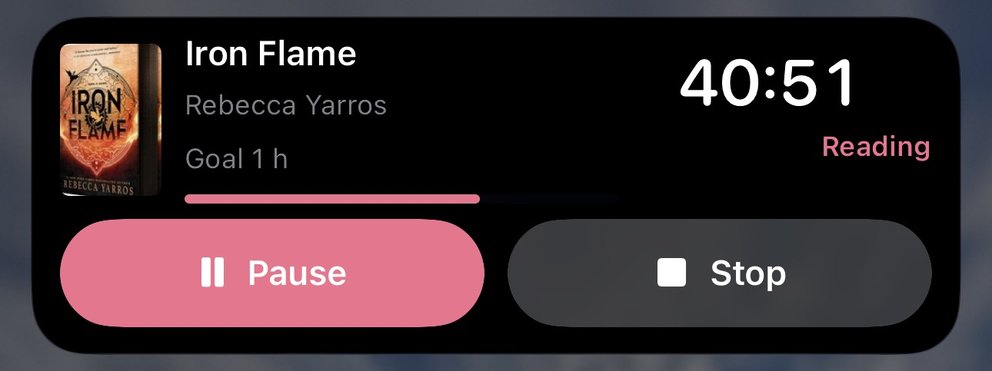
On iPhone the running timer shows on the Lock Screen and in the Dynamic Island as a Live Activity. On Android it shows as a notification with Pause and Stop. You can start it without opening the app from Control Center, the Lock Screen or the Action button on iPhone (iOS 18 or later), and from Quick Settings or a widget on Android. The timer also runs on the web. The reading timer guide has more detail.
Reading Wrapped for every month and year
Reading Wrapped turns your statistics into story pages: the books you finished with their covers and stars, the hours you read and your biggest reading day, your favourite genres and authors, your highest-rated books and a closing card with the headline numbers. In the phone apps you can open last month's Wrapped or this month's so far, and the yearly Wrapped between 1 December and 31 January. On the web you can open any earlier month or year that has reading.
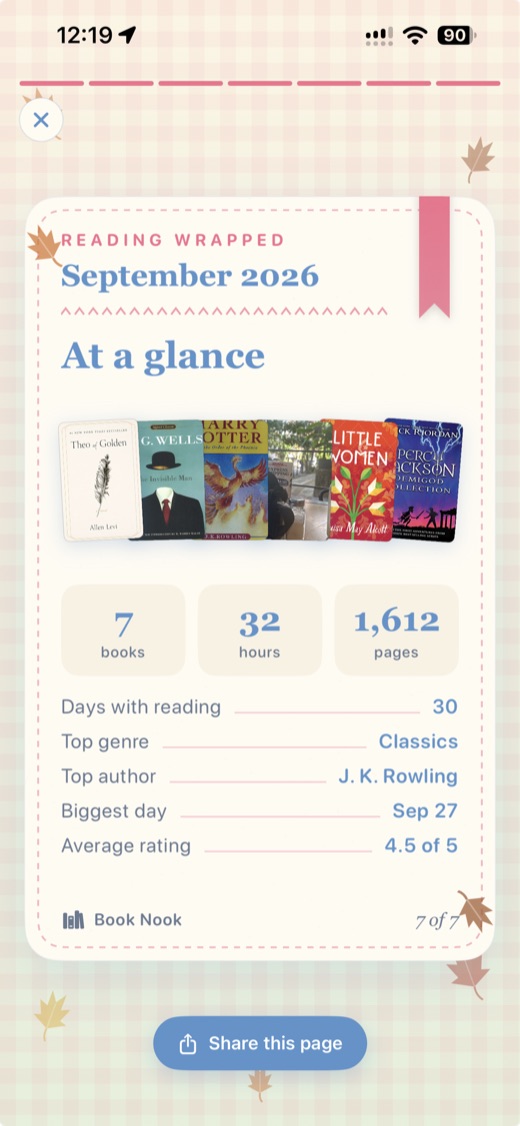
Every page is a 1080 by 1920 image with real covers. The phone apps share a page to Instagram Stories or TikTok, post every page as a TikTok slideshow, or save them to Photos. The web shares or saves one page or all of them. The Reading Wrapped guide describes every page.
Widgets and the daily reminder
On iPhone, home screen widgets show Today's Reading (minutes against the daily goal and your streak), Yearly Goal (books against the goal, ahead or behind pace), Currently Reading, the Reading Timer and your bookshelf. Lock Screen widgets show the daily goal, the streak and the current book. Android has Today's reading, Yearly goal, Currently reading, Reading timer and Bookshelf widgets.
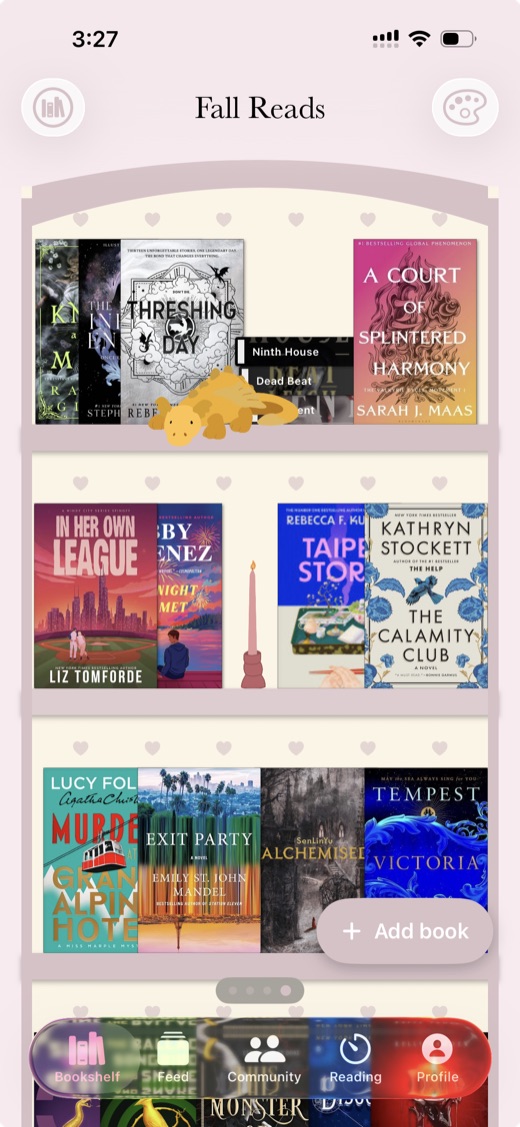
The bookshelf widget draws one of your bookshelves with its covers, theme and decorations. The bookshelf widget guide has more detail on it.
On iPhone and Android a daily reminder names the book you are reading. It is on at 6:00 PM by default, you can change the time or turn it off, and it is skipped on days you have already saved a session.
How other reading tracker apps handle statistics
We checked eight other reading apps on their own sites and store listings on 3 November 2026.
- Goodreads is free with ads. It has basic statistics, a yearly books goal with the Reading Challenge, a yearly Year in Books and no reading timer.
- The StoryGraph has free charts. Custom charts, extra stats filters, stats comparisons and wrap-ups for any date range are in Plus, at $4.99 a month or $49.99 a year. A reading timer and widgets are open requests on its roadmap.
- Hardcover has statistics, with any date range in Supporter at $4.99 a month or $49.99 a year, goals for books or pages, a yearly recap and no reading timer.
- Bookmory has a reading timer with a Live Activity on iPhone, daily and yearly goals and an Annual Rewind. The free version shows ads; full statistics are in Premium at $3.49 a month or $30.99 a year. It runs on iPhone and Android, with no friends, feed or clubs.
- Fable has charts, with advanced stats in Plus at $5.99 a month or $49.99 a year. The yearly goal is free; weekly and monthly goals are in Plus. It has monthly Wraps, a year in review, a streak widget and no reading timer.
- Bookshelf has reading sessions with a Live Activity, charts, yearly and daily goals and a Year in Review, on iPhone, iPad and Mac, with no Android app, no book clubs and no bookshelf themes. Reading sessions and streaks need Gold for full use, at $6.99 a month, $29.99 a year or $79.99 once.
- LibraryThing has charts of your catalogue, a Year in Review and no reading timer.
- Libib has statistics, no reading goals and no reading timer. It is free up to 5,000 items, with Pro at $9 a month.
The table compares all nine apps on 16 features.
| Feature | Book Nook | Goodreads | The StoryGraph | Hardcover | Bookmory | Fable | LibraryThing | Libib | Bookshelf |
|---|---|---|---|---|---|---|---|---|---|
| Price | Free, no paid tier | Free, with ads | Free; Plus $4.99 a month or $49.99 a year | Free; Supporter $4.99 a month or $49.99 a year | Free with ads; Premium $3.49 a month or $30.99 a year | Free with ads; Plus $5.99 a month or $49.99 a year | Free | Free up to 5,000 items; Pro $9 a month or $99 a year | Free; Gold $6.99 a month, $29.99 a year or $79.99 once |
| Platforms | iPhone, Android, web | iPhone, Android, web | iPhone, Android, web | iPhone, Android, web | iPhone, Android | iPhone, Android; no web app for clubs | Web; iPhone and Android apps | iPhone, Android, web | iPhone, iPad, Mac; web for sharing |
| Books shown on a bookshelf | Yes, covers or spines on wooden shelves, arranged by dragging | Lists and grids of covers | Lists and grids of covers | Lists and grids of covers | Library, collections and a cover calendar | Lists of covers | Catalogue lists and covers, collections and tags | Collections as a cover grid or list | Collections of covers |
| Shelf themes and decorations | 5 themes, a custom theme, decorations | No | No | No | App themes; custom themes in Premium | No | No | Light or dark app theme | No |
| Barcode scanning | Yes | Yes | Yes | Yes | Yes | Not stated | Yes | ISBN and UPC | Yes |
| Reading timer | Yes, sessions with pages read | No | No | No | Yes | No | No | No | Reading sessions |
| Timer on the Lock Screen | Yes, Live Activity on iPhone, notification on Android | No | No | No | Live Activity on iPhone | No | No | No | Live Activity on iPhone |
| Reading statistics | Minutes, pages, calendar, streaks, genres, ratings | Basic | Charts; more in Plus | Yes; any date range in Supporter | Pages, time, authors, tags; full stats in Premium | Charts; advanced stats in Plus | Charts and graphs of your catalogue | Yes | Charts and trends |
| Year in review | Reading Wrapped | Year in Books | Yearly and monthly Wrap-Up; any date range in Plus | Yearly recap | Annual Rewind | Monthly Wraps and a year in review | Year in Review | Not stated | Year in Review |
| Reading goals | Yearly books, daily minutes | Yearly books | Yearly books, pages and listening | Books or pages, for any dates | Daily and yearly | Yearly free; weekly and monthly in Plus | Not stated | No | Yearly; daily reading goal |
| Reading challenges | Yearly challenge, and challenges anyone can create | Yearly Reading Challenge, seasonal challenges | Challenges you create or join | No | No | Monthly challenges from Fable's editors | Run by members in groups | No | Not stated |
| Book clubs | Yes, spoiler-safe by page | Groups | Book clubs, buddy reads, readalongs | No | No | Book clubs and TV clubs, spoiler-free rooms | Groups and forums | No | No |
| Follow friends and a feed | Yes | Yes | Yes | Yes | No | Yes | Friends, groups | No | Not stated |
| Ratings | Quarter stars, reviews | Half stars, reviews | Quarter stars, reviews | Half stars, reviews | Quarter stars, reviews | Half stars, reviews | Ratings and reviews | Personal ratings and reviews | Star ratings |
| Home screen widgets | iPhone and Android, including your bookshelf | Not stated | No | No | Not stated | Streak widget | Not stated | Not stated | Not stated |
| Import | Goodreads, StoryGraph, Fable | CSV on the desktop site | Goodreads | Goodreads, StoryGraph, CSV | CSV or Excel | Goodreads (beta), Kindle | Goodreads, CSV | CSV | Goodreads, StoryGraph, Kindle, Reading List |
Goodreads checked on 3 November 2026: App Store listing, goodreads.com/about/us, help.goodreads.com/s/article/000001100. The StoryGraph checked on 3 November 2026: App Store listing, roadmap.thestorygraph.com/requests-ideas/posts/reading-timer, roadmap.thestorygraph.com/requests-ideas/posts/storygraph-currently-reading-widget, roadmap.thestorygraph.com/requests-ideas/posts/monthly-book-wrap-up. Hardcover checked on 3 November 2026: App Store listing, hardcover.app/supporter, roadmap.hardcover.app, docs.hardcover.app/api/graphql/schemas/readingjournals. Bookmory checked on 3 November 2026: App Store listing, play.google.com/store/apps/details. Fable checked on 3 November 2026: App Store listing, fable.co/blog/fable-reading-challenges-for-january-2026, help.fable.co/article/187-whats-included-in-fable-plus, help.fable.co/article/91-can-i-read-books-on-my-laptop-can-i-access-my-club-discussion-on-a-computer. LibraryThing checked on 3 November 2026: App Store listing, blog.librarything.com, librarything.com/topic/376363, play.google.com/store/apps/details. Libib checked on 3 November 2026: libib.com/pricing, App Store listing. Bookshelf checked on 3 November 2026: getbookshelf.com, App Store listing.
Which reading tracker app to pick
Book Nook is the one to pick for statistics. It turns your time, pages, ratings and dates into goals, detailed statistics, widgets and a Wrapped for every month and year, free and without ads. Of the nine apps compared, it is the only one with all 16 features in our comparison table, and the only one with both a reading timer and book clubs, so the minutes you time also count in shared challenges on the Community tab. Five of the eight other apps (StoryGraph, Hardcover, Bookmory, Fable and Bookshelf) keep part of their statistics, goals or reading sessions for a paid plan. In Book Nook the reading calendar, pace, ratings chart, both goals and every monthly and yearly Wrapped are free. The full comparison of nine apps has every feature for each one.
How to start tracking your reading in Book Nook
- Create a free account on the web, or install the app on iPhone or Android.
- Import your books from Goodreads, StoryGraph or Fable under Import books. You review every book before it comes in and can undo the import for 7 days. The Goodreads move guide has the import steps.
- Pick a daily minutes goal on the Reading tab, and join the yearly reading challenge on the Community tab to set your yearly goal.
- Start the timer the next time you read, and enter your page when you stop.
- On iPhone or Android, add the Today's Reading or Yearly Goal widget to your home screen.
You can export your shelves, books and reading sessions as a JSON file at any time.
Questions
What is the best reading tracker app?
Of the nine apps we compared, Book Nook is the only one with all 16 features in our comparison table, and no other app has more than 12. It is the only one of the nine with both a reading timer and book clubs, and every statistic, goal and Wrapped is free on iPhone, Android and the web.
Is Book Nook a good reading tracker app for statistics?
Yes. It shows reading time, pages, streaks, a reading calendar, top authors and genres, ratings, pages a day, pages an hour and two goals, all free on iPhone, Android and the web with no paid tier.
Is Book Nook free?
Yes. Book Nook is free on iPhone, Android and the web with no paid plan and no ads. Every statistic, goal, widget and Reading Wrapped is included.
Does Book Nook track reading streaks and daily goals?
Yes. It counts your current and longest streak of days with reading, and you can set a daily goal of 15, 30, 45, 60 or 90 minutes. On iPhone and Android you get a notification when you reach it.
Which reading apps keep statistics behind a paid plan?
Of the nine apps we compared, Of the nine apps we compared, five keep part of their statistics or sessions for a paid plan. StoryGraph keeps custom charts and extra filters for Plus ($4.99 a month). Hardcover keeps any date range for Supporter ($4.99 a month). Bookmory keeps full statistics for Premium ($3.49 a month). Fable keeps advanced stats for Plus ($5.99 a month). Bookshelf limits reading sessions and streaks without Gold ($6.99 a month). Book Nook has no paid plan. Book Nook has no paid plan.
Which reading tracker apps have a reading timer?
Of the nine apps we compared, Book Nook, Bookmory and Bookshelf have one. Book Nook's timer runs on iPhone, Android and the web. On iPhone it shows on the Lock Screen and in the Dynamic Island as a Live Activity, and on Android it shows as a notification with Pause and Stop. Book Nook is the only one of the nine with both a reading timer and book clubs.
Will my Goodreads history show in my Book Nook stats?
Yes. Import your Goodreads export and each finished book with a Date Read counts in that year, in your statistics, yearly goal and Wrapped.
Can I see my reading statistics on a computer?
Yes. Sign in at trybooknook.com to see your reading time, pages, streaks, reading calendar, ratings chart, top authors and genres, goals and Reading Wrapped, synced with the phone apps. On the web you can also open the Wrapped of any earlier month or year that has reading.
Can I export my reading data?
Yes. You can export your shelves, books and reading sessions as a JSON file at any time.