24 reading challenge ideas for 2027, and how to track them
Updated
A good reading challenge for 2027 has a number, a deadline and a rule for which books count: 24 books, 10,000 pages, 20 minutes a day, or one book from each decade since the 1920s. Book Nook, a free reading tracker for iPhone, Android and the web, runs all of them with a yearly challenge, challenges you create in books, pages or hours, invites, a leaderboard, and points and a stamp when you finish. Of the nine apps we compared, it is the only one with both a reading timer and book clubs.
24 reading challenge ideas for 2027
Most of these are a Books challenge with your own dates. Where another goal type fits better, the idea names it: Pages, Hours, or the daily minutes goal on the timer.
Challenges by number of books and pages
- 12 books in 2027, one a month.
- 52 books in 2027, one a week, as your yearly goal.
- 10,000 pages in 2027: a Pages challenge with Custom dates for 2027.
- 1,000 pages in a month: a Pages challenge with the timeframe This month.
- Three books over 500 pages, the long ones you have put off.
Challenges by time spent reading
- 20 minutes a day, every day: set the daily goal to 20 minutes.
- A 30-day streak in January, with a reading session every day.
- 100 hours of reading in 2027: an Hours challenge with Custom dates for 2027.
- A reading week: 10 hours in 7 days, an Hours challenge with custom dates.
Challenges by genre and author
- One book from 12 different genres, one a month.
- Six books by authors you have never read.
- Every book by one author, with the author's page in Book Nook as the list.
- Four books in translation.
Challenges for series, backlist and your TBR
- Finish a series you started and dropped, with its series page for the order.
- Backlist only: ten books published before 2020.
- Read down your TBR: 15 books already marked to be read before you buy another.
- Ten books you own and have never opened, scanned by barcode onto a bookshelf of their own.
Challenges by decade, place and season
- One book from each decade from the 1920s to the 2020s, 11 books in all.
- A book set on each of the seven continents.
- Spooky October: five horror or gothic books from 1 to 31 October.
- A summer reading challenge from June to August.
Challenges to do with friends
- A buddy read: one book with a friend in a book club.
- The same six books as a friend, racing on the leaderboard.
- A household challenge: everyone at home reads 20 books in the year.
Set your 2027 reading goal with the yearly challenge
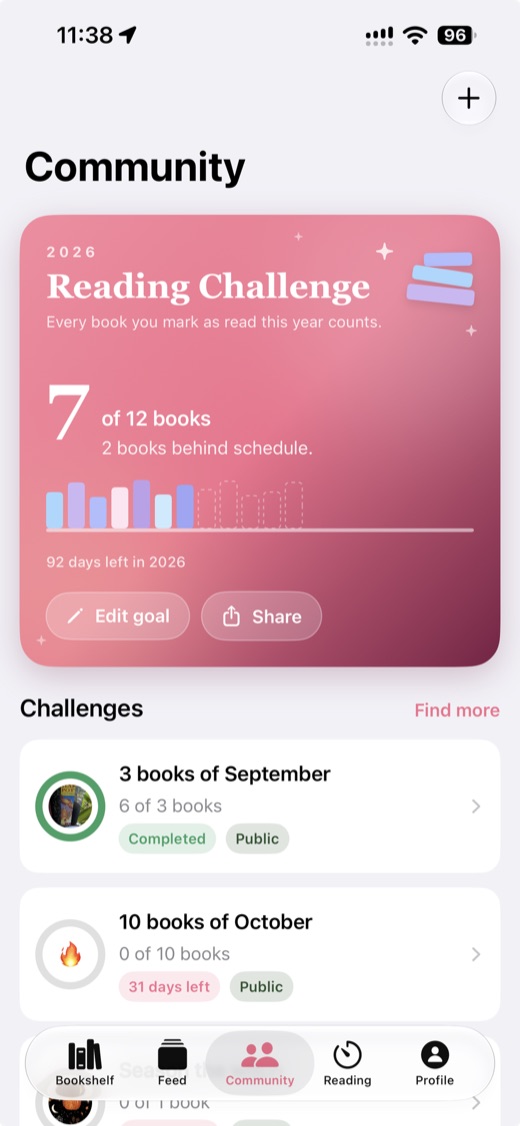
The yearly Reading Challenge sits at the top of the Community tab on iPhone, Android and the web. The 2027 challenge appears on the card on 1 January 2027. Choose a number of books with the minus and plus buttons, or tap the number and type one, then tap Join the challenge. The goal starts at 12 books.
Every book you mark as read during the year counts, so there is nothing to add by hand. The card shows your books read against the goal, whether you are ahead of or behind an even pace through the year, and a line such as "66 days left in 2027. 7 books to go." Under the number is a small shelf with one spine for each book of your goal, filled in as you finish them, and an extra spine for every book past it. Edit goal changes the number at any time and sets the yearly goal on your profile too. Share sends the card as an image.
Create a challenge with a goal and a deadline
- On the Community tab, tap the plus button and choose Reading challenge. Any reader can create one.
- Give it a title of 3 to 60 characters and, if you like, a description and a cover photo.
- Choose the goal type, Books, Pages or Hours, and enter the number.
- Choose the timeframe: This month, This year, or Custom with a start and end date. This month and This year mean the month and year you create the challenge in, so use Custom for a 2027 challenge you set up in 2026.
- Leave Public on so anyone can find and join it, or turn it off to keep the challenge private.
- Tap Create (Create challenge on the web).
In these challenges only the books you add count. On the challenge page, tap Add books and pick books you have finished, are reading or plan to read, from your shelf or from search. A book counts when you finish it between the challenge's dates. This is what makes a genre, author or decade challenge work: you add only the books that fit. Pages counts the page totals of the added books you finish, and Hours counts the time you read those books with the timer.
Invite friends and follow the leaderboard
From the menu on the challenge page, Invite readers sends an invite by username, and the share link lets you post the challenge anywhere. The leaderboard sorts every member by the challenge's goal, and the page shows what other members are reading. Share progress sends how far you have got. For a buddy read, a Book Nook book club reads one book at a time and folds comments from members further ahead until you reach the page they were written at.
Track progress through the year
Each challenge shows a progress ring on its page. When a challenge runs 14 days or more and you have not reached the target, Book Nook sends a notice when 7 days are left and again when 1 day is left. The yearly goal widget on iPhone and Android shows books finished against your goal, your pace and the cover of the last book you finished. The bookshelf widget guide covers every widget. At the end of the year, your Reading Wrapped sums up the books, pages and hours.
Points and stamps for finishing a challenge
Finishing a challenge earns 25 points and a stamp. A challenge you created yourself counts once 3 other readers have joined it. Meeting your yearly goal earns 10 points and a round stamp printed with the year, GOAL MET and the number of books.
A challenge stamp is flower-shaped, with the title around the top and the month and year you finished. When the challenge has a photo, the stamp prints it. Without one, the icon comes from the title: spooky, halloween, witch, ghost, night or moon gives a moon; summer, sun or beach gives a sun; love, romance or heart gives a heart. New stamps open in a full-screen popup, and every stamp you earn stays on the library card on your public profile.
A daily minutes goal and a reading streak
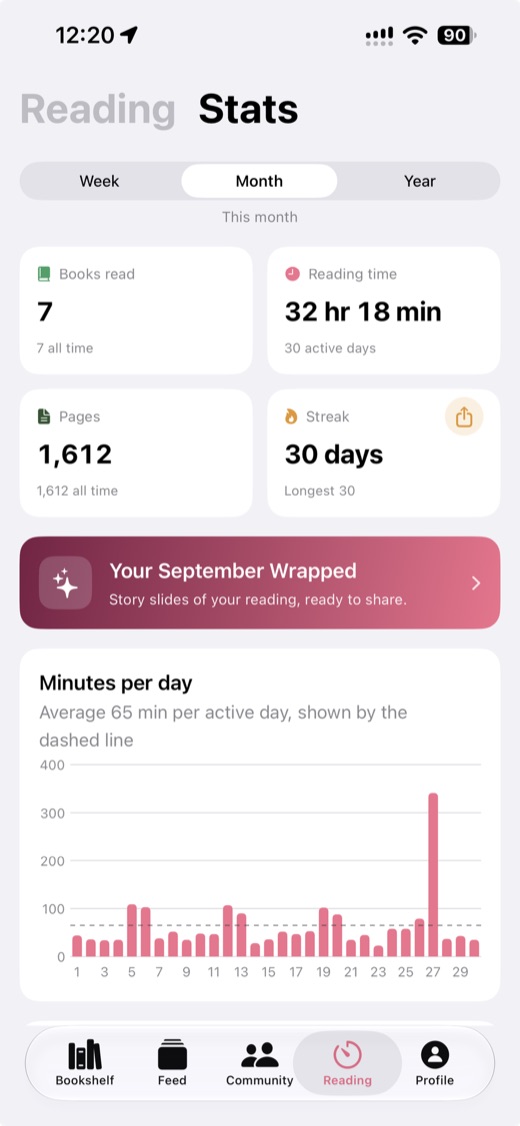
The daily goal is set on the timer on the Reading tab. Pick 15, 30, 45, 60 or 90 minutes, or adjust it in steps of 5 minutes. It starts at 30. Each timed session counts toward it, and the Stats page shows a ring with today's minutes and how many days in the chosen range met the goal.
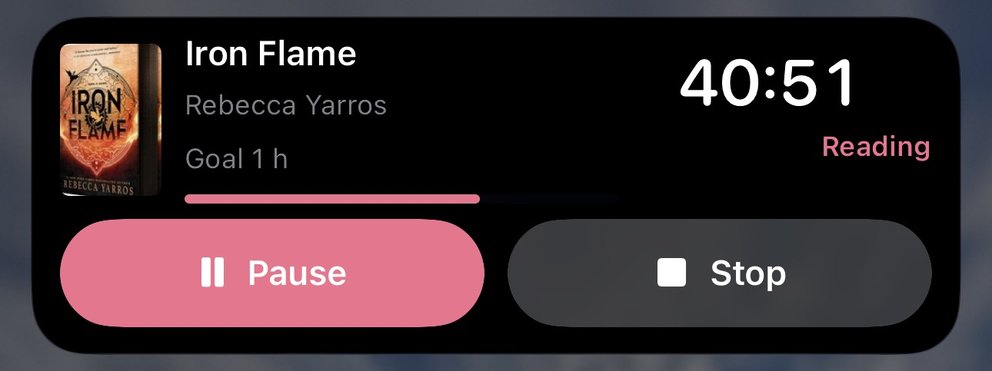
On iPhone the running timer's Live Activity shows how far you are through today's goal, and the Reading Goal Lock Screen widget shows today's minutes against it. The today's reading widget on iPhone and Android shows the same with your streak. Stats shows your current streak of days in a row with reading and your longest. A daily reminder on iPhone and Android names the book you are reading. It is on at 6:00 PM by default and is skipped on days you have already read. The reading timer guide covers timing sessions in full.
Reading challenges in other apps
Goodreads has its yearly Reading Challenge for a number of books, and seasonal challenges. The StoryGraph has challenges you create or join, and a yearly goal in books or pages. Fable runs monthly challenges from its editors, with a yearly goal free and weekly and monthly goals in Plus. On LibraryThing, members run challenges in groups. Hardcover sets goals in books or pages for any dates, and Bookmory has daily and yearly goals.
For reading challenges, Book Nook is the pick of the nine apps we compared. It is the only one with both a reading timer and book clubs, so it can count a challenge in hours and run a buddy read in the same app. It counts a challenge in books, pages or hours, times hours with its own reading timer, gives daily, yearly and custom-date goals free with no paid tier, and awards points and a stamp for each challenge finished. Of the nine apps in our comparison, it is the only one with all 16 features in the table, and no other app has more than 12. The detail is in Book Nook vs Goodreads, Book Nook vs StoryGraph, Book Nook vs Fable, Book Nook vs Hardcover, Book Nook vs Bookmory and Book Nook vs LibraryThing, and in Goodreads alternatives.
Start your 2027 challenge in Book Nook
Book Nook works on iPhone, Android and the web, with no ads. Create an account and import your books from Goodreads, StoryGraph or Fable so your shelf is ready on 1 January.
Questions
How do I set a reading goal for 2027?
From 1 January 2027, open the Community tab in Book Nook, choose a number of books on the yearly Reading Challenge card and tap Join the challenge. Every book you mark as read in 2027 counts toward it.
Can I change my reading goal during the year?
Yes. Tap Edit goal on the yearly Reading Challenge card to change the number at any time. It also updates the yearly goal on your profile, and books you have already read still count.
Can I make a reading challenge with friends?
Yes. Create a challenge with a goal in books, pages or hours and its dates, then invite friends by username or share its link. Everyone who joins is on the leaderboard.
Do books I finished before joining a challenge count?
In the yearly challenge, every book you read during the year counts. In other challenges, add the book on the challenge page; it counts if you finished it between the challenge's dates.
What do I get for finishing a reading challenge?
25 points and a stamp with the challenge's title and the month you finished, kept on the library card on your profile. A challenge you created yourself counts once 3 other readers have joined it. Meeting the yearly goal earns 10 points and its own stamp.
Can I set a reading challenge in pages or hours instead of books?
Yes. When you create a challenge in Book Nook, choose Books, Pages or Hours as the goal type. Hours are counted from reading timer sessions on the books you add to the challenge, and a separate daily goal in minutes sits on the timer.
Can I keep a reading challenge private?
Yes. Turn off Public when you create the challenge, then invite readers by username.
Is Book Nook free?
Yes. It is free on iPhone, Android and the web, with no paid tier and no ads.