
Goodreads vs StoryGraph compared, and the free app with a bookshelf and a reading timer
Updated
Goodreads, owned by Amazon, has more than 150 million members and the Reading Challenge, and is free with ads. The StoryGraph is an independent tracker known for charts and recommendations by mood and pace, and keeps its deeper statistics for Plus at $4.99 a month. Neither shows your books on a bookshelf or has a reading timer. Book Nook has both, plus the statistics, goals, challenges, friends and book clubs readers use on either app, free with no ads on iPhone, Android and the web. It is the pick for readers choosing between the two, and imports both apps' exports.
Goodreads and StoryGraph at a glance
Goodreads
Goodreads launched in 2007 and has been owned by Amazon since 2013. It has more than 150 million members and is known for reader ratings and reviews, groups, the Goodreads Choice Awards, the yearly Reading Challenge and seasonal challenges. Your shelves are lists or grids of covers. The app scans barcodes, and you import a CSV file on the desktop site.
The StoryGraph
The StoryGraph is an independent reading tracker founded in 2019. It is known for charts of your reading, for recommendations by mood and pace, and for content warnings on books. It has challenges you create or join, and it imports a Goodreads export.
Goodreads, StoryGraph and Book Nook compared
The table sets the three apps against the 16 features in our comparison of nine reading apps. Goodreads and StoryGraph were checked on 3 November 2026.
| Feature | Book Nook | Goodreads | The StoryGraph |
|---|---|---|---|
| Price | Free, no paid tier | Free, with ads | Free; Plus $4.99 a month or $49.99 a year |
| Platforms | iPhone, Android, web | iPhone, Android, web | iPhone, Android, web |
| Books shown on a bookshelf | Yes, covers or spines on wooden shelves, arranged by dragging | Lists and grids of covers | Lists and grids of covers |
| Shelf themes and decorations | 5 themes, a custom theme, decorations | No | No |
| Barcode scanning | Yes | Yes | Yes |
| Reading timer | Yes, sessions with pages read | No | No |
| Timer on the Lock Screen | Yes, Live Activity on iPhone, notification on Android | No | No |
| Reading statistics | Minutes, pages, calendar, streaks, genres, ratings | Basic | Charts; more in Plus |
| Year in review | Reading Wrapped | Year in Books | Yearly and monthly Wrap-Up; any date range in Plus |
| Reading goals | Yearly books, daily minutes | Yearly books | Yearly books, pages and listening |
| Reading challenges | Yearly challenge, and challenges anyone can create | Yearly Reading Challenge, seasonal challenges | Challenges you create or join |
| Book clubs | Yes, spoiler-safe by page | Groups | Book clubs, buddy reads, readalongs |
| Follow friends and a feed | Yes | Yes | Yes |
| Ratings | Quarter stars, reviews | Half stars, reviews | Quarter stars, reviews |
| Home screen widgets | iPhone and Android, including your bookshelf | Not stated | No |
| Import | Goodreads, StoryGraph, Fable | CSV on the desktop site | Goodreads |
Goodreads checked on 3 November 2026: App Store listing, goodreads.com/about/us, help.goodreads.com/s/article/000001100. The StoryGraph checked on 3 November 2026: App Store listing, roadmap.thestorygraph.com/requests-ideas/posts/reading-timer, roadmap.thestorygraph.com/requests-ideas/posts/storygraph-currently-reading-widget, roadmap.thestorygraph.com/requests-ideas/posts/monthly-book-wrap-up.
Of the nine apps we compared, Book Nook is the only one with all 16 features, and no other app has more than 12. The other six apps are in the full comparison of bookshelf apps.
How Goodreads and StoryGraph differ
- Price: Goodreads is free and shows sponsored books and display ads. StoryGraph is free, with a Plus plan at $4.99 a month or $49.99 a year.
- Statistics: Goodreads has basic statistics. StoryGraph has charts of your reading, and Plus adds custom charts, extra statistics filters and statistics comparisons.
- Ratings: Goodreads added half star ratings in October 2026. StoryGraph has quarter star ratings with reviews.
- Goals: Goodreads counts books a year. StoryGraph counts books, pages or listening.
- Year in review: Goodreads has a Year in Books once a year. StoryGraph has yearly and monthly Wrap-Up graphics, and Wrap-Ups for any date range in Plus.
- Groups and clubs: Goodreads has groups. StoryGraph has book clubs, buddy reads and readalongs.
For a longer look at each, see Book Nook vs Goodreads and Book Nook vs StoryGraph.
What Goodreads and StoryGraph leave out
Several features readers look for in a reading app are missing from one or both, as of 3 November 2026.
- Bookshelf view: both show your books as lists and grids of covers, with no shelf themes or decorations.
- Reading timer: neither times reading sessions nor shows a timer on the Lock Screen.
- Widgets: StoryGraph has no home screen widget.
What Book Nook adds
Book Nook is a free reading tracker for iPhone and iPad, Android and the web, synced between them. It keeps what readers use Goodreads and StoryGraph for: statuses, star ratings (in quarter stars) and reviews, a yearly goal and reading challenge, friends, a feed and book clubs. It is the only one of the nine apps we compared that shows your books on a bookshelf, and the only one with both a reading timer and book clubs. Every feature is free, with no paid tier and no ads.
Bookshelf view, themes and decorations
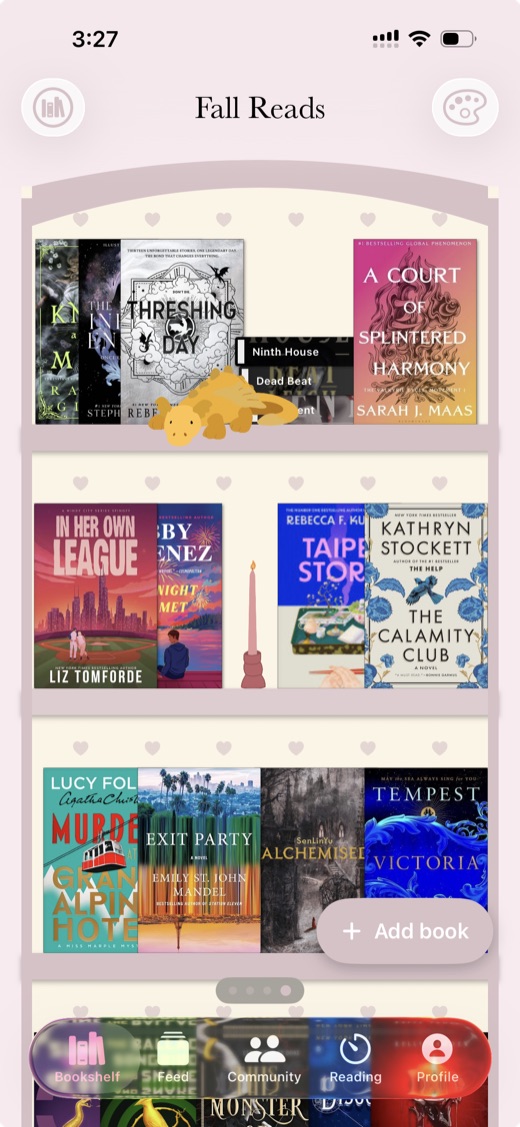
Your books stand on wooden shelves as covers or spines, and you drag them into the order you want. Pick one of five themes (Simple, Dark Academia, Cottagecore, Coquette and Matcha Cafe) or design your own, and place any of 65 decorations, such as plants, candles, lamps and dragons, between the books. The Real book sizes switch stands paperbacks and hardcovers at their own heights. You can have as many bookshelves as you like, and List and Mosaic views show the same books without the shelf. See virtual bookshelf apps and aesthetic bookshelf themes.
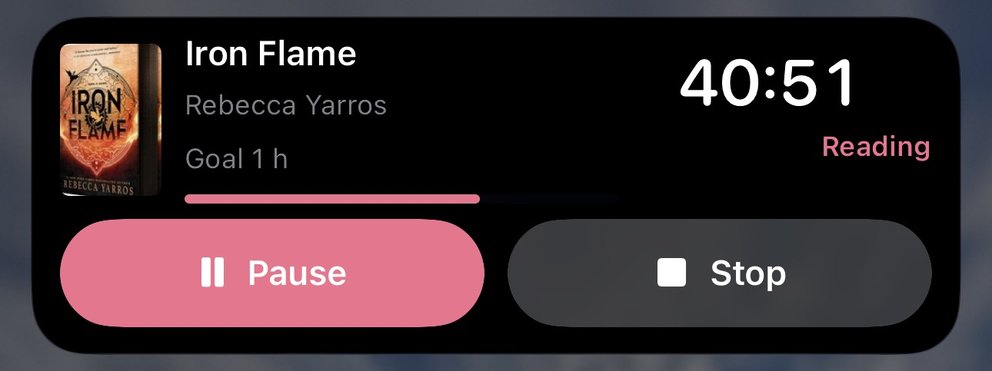
A reading timer on the Lock Screen
The timer records each session with the pages you read. On iPhone the running timer shows on the Lock Screen and in the Dynamic Island as a Live Activity, and you can start it from Control Center, the Lock Screen or the Action button without opening the app (iOS 18 or later). On Android it shows as a notification with Pause and Stop, and starts from Quick Settings or a widget. On both phones a daily reminder, on at 6:00 PM by default, names the book you are reading and is skipped on days you have already saved a session. How the reading timer works.
Statistics, goals and Reading Wrapped, all free
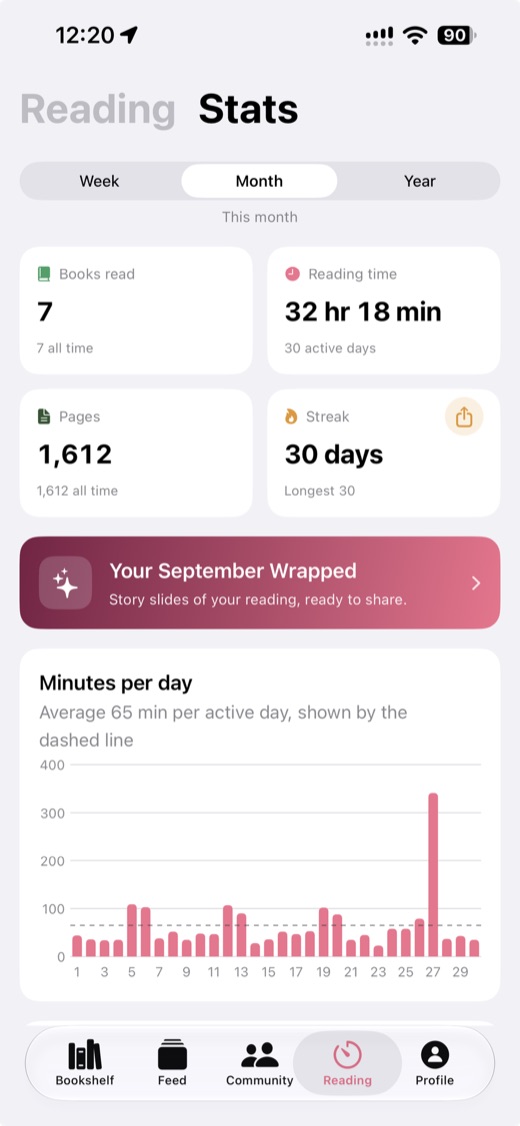
Book Nook shows minutes and pages over time, a reading calendar, streaks, genres and a ratings chart, with a daily minutes goal and a yearly books goal. Each month and each year gets a Reading Wrapped: 9:16 pages you can share to Instagram Stories and TikTok from the phone apps, or share and save from the web. What is in Reading Wrapped.
Widgets on iPhone and Android
On iPhone the home screen widgets are Bookshelf, Currently Reading, Today's Reading, Yearly Goal and Reading Timer, and the Lock Screen widgets show your daily goal, your streak and the book you are reading. The Bookshelf widget draws one of your bookshelves with its covers and decorations, in medium and large sizes. Android has the same five home screen widgets, and its Bookshelf widget resizes from 4 by 2 cells up to the whole home screen. More on the bookshelf widget.
Finding your next book
Search opens on this week's New York Times bestsellers and a row of genres. Every book has a page with readers' reviews and discussion threads, and tapping an author's name opens every book by that author. The New releases nook lists what came out this week, the month's releases in the genres you pick, new books from authors on your shelves and what is coming soon.
Friends, book clubs and challenges
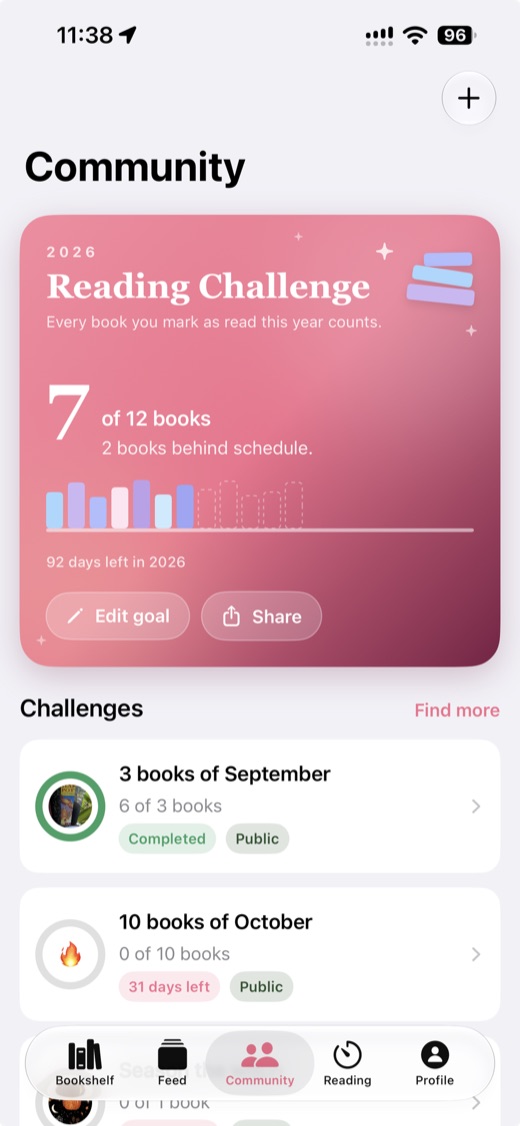
The feed shows what the readers you follow are reading, finishing and reviewing, with likes and comments. A book club reads one book at a time. Each comment records how far into the book its writer was, and a comment from further ahead stays folded, with its replies, until you reach that point or tap it. Members reading a different edition of the book are in the same club discussion, and notifications never quote a comment you have not reached. Reading challenges have a goal and a deadline, and anyone can create one. There is also a yearly reading challenge, and nooks for talking about books in a thread of posts. Reviews and discussion threads on every book page take spoiler tags. More on book clubs and reading challenge ideas for 2027.
Moving from Goodreads
- On goodreads.com, open My Books.
- Under Tools, choose Import and export, then Export Library, and download the file.
- In Book Nook, open Import books from Getting started or the settings icon on the Profile tab, and choose Goodreads.
- Choose the file, check the books, and pick where they go: bookshelves named after each status, bookshelves named after your own Goodreads shelves, one new bookshelf, or a bookshelf you already have.
Statuses, ratings, written reviews and the dates you added and finished each book come across. Goodreads exports carry no start date. The full guide to moving from Goodreads.
Moving from StoryGraph
- On app.thestorygraph.com, open your profile menu and choose Manage account.
- Scroll to Manage your data, choose Export StoryGraph library and download the file.
- In Book Nook, open Import books, choose StoryGraph and pick the file.
- Check the books and choose their bookshelves: by status, by your StoryGraph tags, on one new bookshelf, or on a bookshelf you already have.
Ratings, reviews and the dates you started and finished each book come across, and books marked did not finish keep that status.
What happens when you import
You see every book before it comes in and can untick any of them. Books already on your shelves are skipped unless you choose to update them from the file, so importing twice does no harm, and you can undo an import for 7 days. Covers, authors and page counts missing from the file are filled in from Book Nook's catalogue. Your account can be exported as a JSON file at any time. Importing copies your library, so your Goodreads or StoryGraph account stays as it was.
Which to choose
Book Nook is the pick for a reader choosing between Goodreads and StoryGraph. Readers who use Goodreads for its Reading Challenge and reviews, or StoryGraph for its statistics and clubs, get a yearly challenge, reviews, reading statistics and book clubs in Book Nook free, and also get a bookshelf view and a reading timer. Both apps' exports import in a few minutes. Sign up free.
Questions
Is StoryGraph better than Goodreads?
For a reader choosing between Goodreads and StoryGraph, Book Nook is the pick. It has reading statistics, a monthly and yearly Reading Wrapped, book clubs, challenges and friends, all free with no ads, and adds a bookshelf view and a reading timer that neither app has, plus home screen widgets, which StoryGraph lacks. StoryGraph is known for its charts, with extras in Plus, and Goodreads for its 150 million members, with ads. Book Nook imports either app's export.
Does Goodreads or StoryGraph show books on a bookshelf?
No. Both show your books as lists or grids of covers. Of the nine apps we compared, Book Nook is the only one that shows your books on a bookshelf, with five themes, a custom theme and 65 decorations, free on iPhone, Android and the web.
Does Goodreads or StoryGraph have a reading timer?
Neither does, as of November 2026. Book Nook has one, with a Live Activity on the iPhone Lock Screen and a notification with Pause and Stop on Android.
Which is better for book clubs, Goodreads or StoryGraph?
Goodreads has groups, and StoryGraph has book clubs, buddy reads and readalongs. Book Nook has book clubs where each comment records how far into the book its writer was, and a comment from further ahead stays folded until you reach that point. Members reading different editions share one discussion, and it is free.
Do Goodreads and StoryGraph cost money?
Both have free tiers. Goodreads is free and shows sponsored books and display ads. StoryGraph Plus costs $4.99 a month or $49.99 a year. Book Nook has no ads and no paid tier.
Is Book Nook free?
Yes. Every feature, including statistics, Reading Wrapped, widgets on iPhone and Android, and book clubs, is free, with no paid tier and no ads, on iPhone, Android and the web.
Can I import my Goodreads library into Book Nook?
Yes. Export your library from My Books, Import and export on goodreads.com, then choose Goodreads under Import books. Statuses, ratings, written reviews and the dates you added and finished each book come across, and you can undo the import for 7 days.
Can I move from StoryGraph to Book Nook?
Yes. Export your library from StoryGraph (Manage account, Manage your data) and choose StoryGraph under Import books. Statuses, ratings, reviews and reading dates come across, and you can undo the import for 7 days.
Can I use Book Nook on a computer?
Yes. Your bookshelves, the reading timer, statistics, book clubs, the feed and challenges all work at trybooknook.com, synced with the iPhone and Android apps.