
Book Nook vs Fable
Updated
We recommend Book Nook as the Fable alternative for readers who want book clubs and a full reading tracker in one free app, with no ads and no paid tier. Both apps have book clubs, a feed, goals and monthly and yearly wraps. Book Nook also shows your books on a themed bookshelf, times your reading on the iPhone Lock Screen or in an Android notification, includes every statistic and goal for free, and runs fully on the web, clubs included. Fable shows ads on its free tier, and Fable Plus costs $5.99 a month or $49.99 a year.
Of the nine apps in our comparison of bookshelf apps, Book Nook is the only one with both a reading timer and book clubs, and the only one with all 16 features in that comparison's table; no other app has more than 12.
Book Nook and Fable side by side
| Feature | Book Nook | Fable |
|---|---|---|
| Price | Free, no paid tier | Free with ads; Plus $5.99 a month or $49.99 a year |
| Platforms | iPhone, Android, web | iPhone, Android; no web app for clubs |
| Books shown on a bookshelf | Yes, covers or spines on wooden shelves, arranged by dragging | Lists of covers |
| Shelf themes and decorations | 5 themes, a custom theme, decorations | No |
| Barcode scanning | Yes | Not stated |
| Reading timer | Yes, sessions with pages read | No |
| Timer on the Lock Screen | Yes, Live Activity on iPhone, notification on Android | No |
| Reading statistics | Minutes, pages, calendar, streaks, genres, ratings | Charts; advanced stats in Plus |
| Year in review | Reading Wrapped | Monthly Wraps and a year in review |
| Reading goals | Yearly books, daily minutes | Yearly free; weekly and monthly in Plus |
| Reading challenges | Yearly challenge, and challenges anyone can create | Monthly challenges from Fable's editors |
| Book clubs | Yes, spoiler-safe by page | Book clubs and TV clubs, spoiler-free rooms |
| Follow friends and a feed | Yes | Yes |
| Ratings | Quarter stars, reviews | Half stars, reviews |
| Home screen widgets | iPhone and Android, including your bookshelf | Streak widget |
| Import | Goodreads, StoryGraph, Fable | Goodreads (beta), Kindle |
Fable checked on 3 November 2026: App Store listing, fable.co/blog/fable-reading-challenges-for-january-2026, help.fable.co/article/187-whats-included-in-fable-plus, help.fable.co/article/91-can-i-read-books-on-my-laptop-can-i-access-my-club-discussion-on-a-computer.
Your books on a bookshelf
Book Nook draws your books standing on wooden shelves, as covers or as spines. You drag a book to move it, lay it flat to start a stack, or tilt it. There are five themes (Simple, Dark Academia, Cottagecore, Coquette and Matcha Cafe), and you can design a theme of your own. You can place any of 65 decorations, such as plants, candles, lamps and dragons, between the books, and switch on lights under the boards.
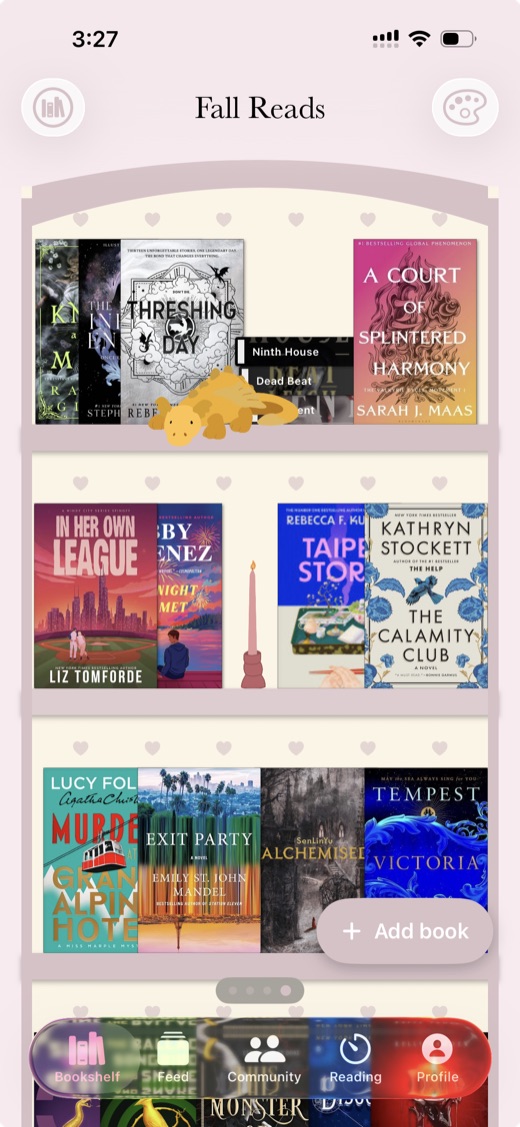
The Real book sizes switch draws each book at the height of its edition, from mass market paperbacks to oversize editions. You can keep as many bookshelves as you like. The List and Mosaic views show the same books, and your books keep their places on the shelf. On iPhone and Android a home screen widget shows one of your bookshelves as the app draws it. See virtual bookshelf apps and the bookshelf widget.
Fable shows your books as lists of covers. It has no shelf themes or decorations.
Adding books
Book Nook has three ways to add a book. Search looks in Open Library, ISBNdb and Google Books and fills in covers, page counts and descriptions. The barcode scanner reads a book's ISBN with the phone's camera and fills in the cover and details (how to catalogue a home library). For a book no catalogue has, you add it by hand and take a photo of your own copy as the cover. Each book has a status, page progress and a quarter-star rating.
Reading timer and daily reminder
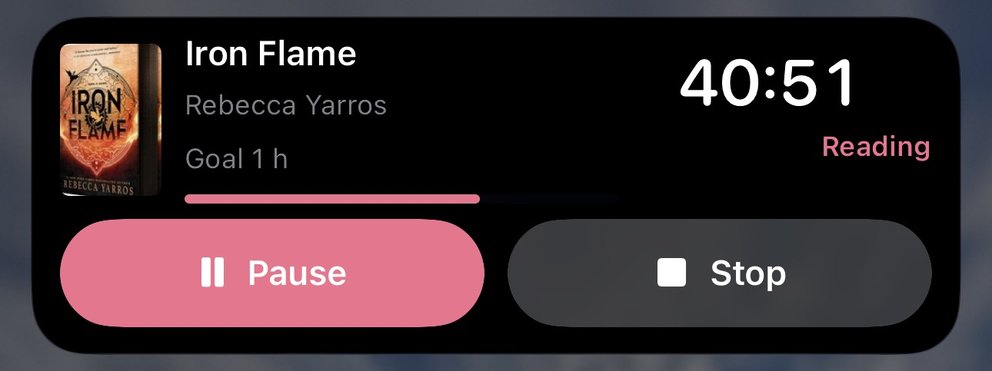
Book Nook's reading timer records each session with its minutes and the pages you read. On iPhone the running timer shows on the Lock Screen and in the Dynamic Island as a Live Activity. With iOS 18 or later you can start it from Control Center, the Lock Screen or the Action button. On Android the timer shows as a notification with Pause and Stop, and you can start it from a Quick Settings tile or a home screen widget. The timer also works on the web. A daily reminder on iPhone and Android names the book you are reading; it is on at 6:00 PM by default, and you can change the time or turn it off. See reading timer apps.
Fable has no reading timer.
Reading statistics and goals
Book Nook's statistics show minutes and pages over time, a reading calendar, streaks, genres and a ratings chart. You can set a daily minutes goal and a yearly books goal. On iPhone and Android, home screen widgets show today's minutes against your daily goal, your streak and your yearly goal. On iPhone, Lock Screen widgets show the daily goal, the streak and the book you are reading. All of this is free. See reading tracker apps.
Fable has charts of your reading, with advanced stats in Fable Plus. Its yearly goal is free, and weekly and monthly goals are in Plus. It has a streak widget.
Monthly and yearly Reading Wrapped
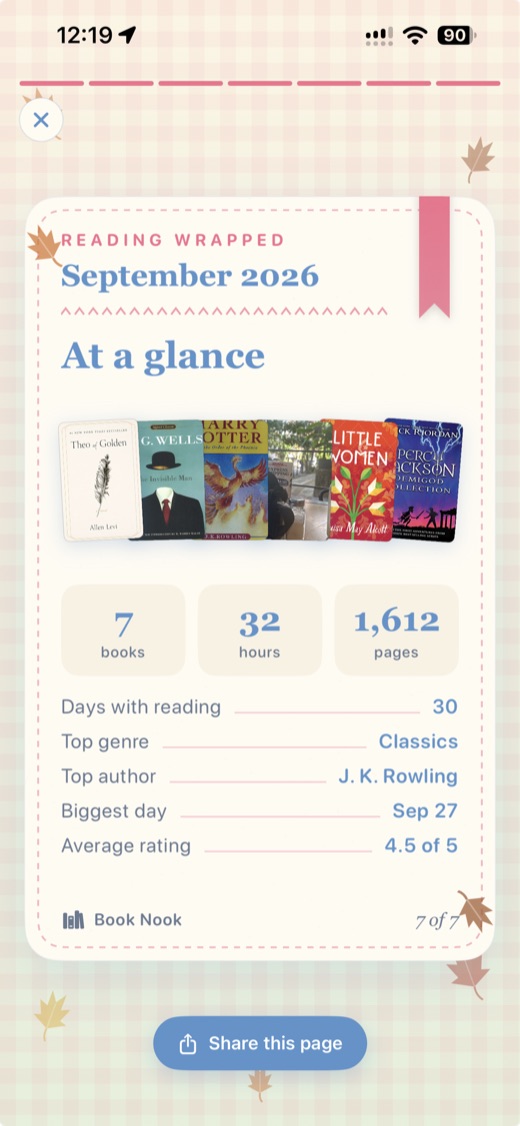
Book Nook makes a Reading Wrapped for each month and each year as 9:16 pages. The iPhone and Android apps share them to Instagram Stories and TikTok, and the web app shares and saves them. See what Reading Wrapped shows.
Fable has Monthly Wraps and a year in review. Fable Plus adds more ways to customise the Monthly Wrap templates.
Book clubs, the feed, challenges and nooks
A Book Nook book club reads one book at a time. The app knows each member's page from their copy on the shelf, and another edition of the same book counts. A comment written by a member further ahead stays folded until you reach that page, or until you tap it. Start a private book club on any book page to read that book with friends you invite. See book club apps.
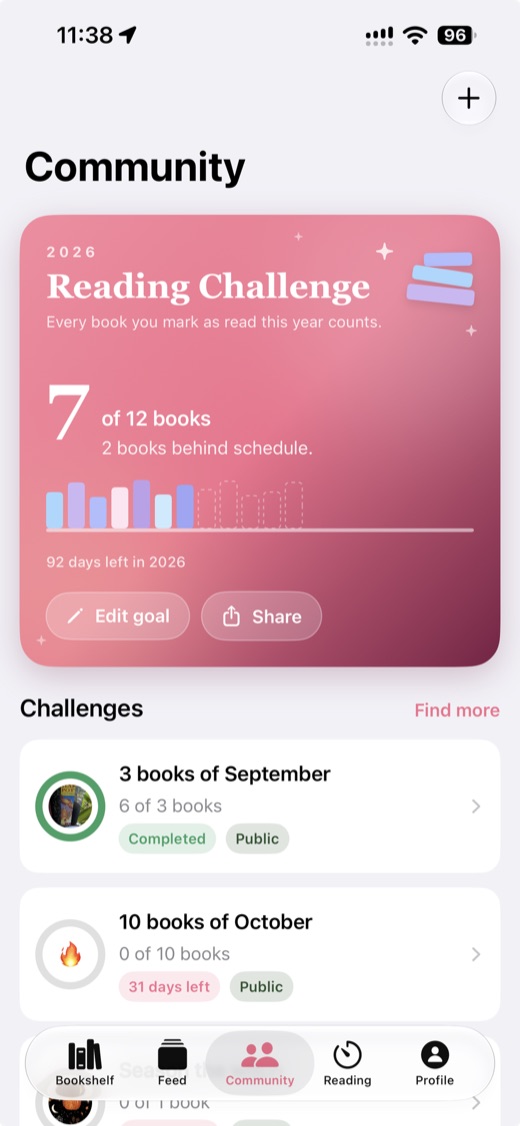
Every book page has reviews and a discussion thread. Spoilers the writer marks stay hidden until a reader taps them, and readers who finished the book see them in the clear. The feed shows what the readers you follow are reading, finishing and reviewing, with likes and comments. Anyone can create a reading challenge with a goal and a deadline, and there is a yearly challenge. Nooks are groups for talking about books. You earn points for reviews, posts, comments and finished books, and stamps for milestones such as a first review. Both show on your public profile. See reading challenge ideas for 2027.
Fable has book clubs, a feed, and monthly challenges set by Fable's editors. Fable sorts club discussion into rooms by chapter. Book Nook folds each comment by page, so you see everything up to the page you are on.
Platforms and sync
Book Nook runs on iPhone and iPad (iOS 17 or later), Android (8.0 or later) and the web at trybooknook.com. Your bookshelves, sessions, clubs and challenges sync between them. Fable has iPhone and Android apps; its help centre says its clubs cannot be used on a computer yet.
Price
Book Nook is free, with no subscription, no paid tier and no ads. Fable is free with ads. Fable Plus removes the ads and adds advanced stats, custom goals and Monthly Wrap options for $5.99 a month or $49.99 a year. Everand subscriptions include Plus.
About Fable
Fable is a book club app owned by Everand, part of Scribd. It rates in half stars; Book Nook rates in quarter stars. Fable imports from Goodreads (in beta) and Kindle; Book Nook imports Goodreads, StoryGraph and Fable files.
Book Nook for each kind of reader
Readers with a physical bookshelf
Scan each book's barcode as you go along your shelves, then arrange the books in Book Nook to match your real ones.
Readers who want an aesthetic digital shelf
Show a bookshelf on your public profile for friends to see, with the theme and decorations you chose. See ideas for an aesthetic bookshelf.
Readers who track their reading with statistics
Every chart and goal in Book Nook is free, and each timed session adds its minutes and pages to them, so the numbers come from the reading you did. On iPhone you can keep your streak and daily goal on the Lock Screen without opening the app.
Readers who keep a book journal
Each book keeps its dates started and finished, every timed session with its pages, a quarter-star rating and your review, with spoilers marked. You can export all of it as a JSON file at any time.
How to move from Fable to Book Nook
Fable has no export button. Two Chrome extensions, ShelfBridge and Fable Exporter, save your Fable library as a Goodreads-format file that Book Nook reads.
- On a computer, add the ShelfBridge or Fable Exporter extension to Chrome.
- Sign in to fable.co in Chrome and run the extension. It saves a file named goodreads_import.csv.
- Create a Book Nook account on the web, or download the app on iPhone or Android.
- Open Import books and choose Fable. On the web, pick the file straight from your computer. On iPhone, send the file to the phone by AirDrop or email, save it to Files, then choose it.
- Review the list. Edit or leave out any book.
- Import. By default the books go onto new bookshelves named after their status and books already on your shelves are skipped; you can choose one new bookshelf or an existing one instead, or update the books you already have. Missing covers, authors and page counts are filled in afterwards. You can undo the import for 7 days.
Book Nook reads the title, author, ISBN, status, rating, page count, dates and any written review the file holds. It imports Goodreads and StoryGraph files the same way. See how to move from Goodreads to Book Nook.
Which to pick
Pick Book Nook. It has the book clubs, feed and monthly wraps that Fable readers use, adds a bookshelf you can see, a reading timer and full statistics, and is free with no ads on the web, iPhone and Android. It is the only one of the nine with all 16 features we compared. Your Fable library comes across with a Chrome extension and Import books. For other comparisons, see Book Nook vs The StoryGraph, Book Nook vs Goodreads and Goodreads alternatives.
Questions
Is Book Nook better than Fable?
Yes. Both have book clubs and a feed, and Book Nook adds a bookshelf you can see, a Lock Screen reading timer, free statistics with no ads and a web app with clubs included. Of the nine apps we compared, it is the only one with both a reading timer and book clubs.
Is Fable free?
Fable is free with ads. Fable Plus removes the ads and adds advanced stats and custom goals for $5.99 a month or $49.99 a year, and Everand subscriptions include Plus.
Is there a Fable alternative without ads?
Yes. Book Nook is free with no ads and no paid tier, and it has book clubs, a feed, challenges and monthly and yearly Reading Wrapped on iPhone, Android and the web.
Does Fable have a reading timer?
No. Book Nook has one: it records minutes and pages for each session, shows on the iPhone Lock Screen and in the Dynamic Island as a Live Activity, and shows as a notification with Pause and Stop on Android.
Can I import my Fable library into Book Nook?
Yes. Use the ShelfBridge or Fable Exporter Chrome extension to save your Fable library as a file, then choose Fable under Import books in Book Nook. You review every book before it comes in and can undo the import for 7 days.
Can I use Fable on a computer?
Fable has iPhone and Android apps, and its help centre says its clubs cannot be used on a computer yet. Book Nook runs at trybooknook.com with book clubs, the feed, challenges, nooks, your bookshelves, the timer and statistics, synced with the iPhone and Android apps.
Does Book Nook have spoiler-free book clubs like Fable?
Yes. Fable sorts club discussion into rooms by chapter. Book Nook knows each member's page and folds each comment by page, so you see everything up to the page you are on, and a comment from someone further ahead stays folded until you reach that page or tap it.
Does Fable show my books on a bookshelf?
Fable shows lists of covers. Book Nook draws your books standing on themed shelves, as covers or spines.
Can I scan a book's barcode to add it?
Yes. Book Nook's scanner reads a book's ISBN with the phone's camera on iPhone and Android and fills in the cover and details.
Does Book Nook have a monthly wrap like Fable?
Yes. Book Nook makes a Reading Wrapped for every month and every year, free, as 9:16 pages. The iPhone and Android apps share them to Instagram Stories and TikTok, and the web app shares and saves them.